本範例示範如何編寫一個函式,逐位元組比較兩個檔案內容,直到發現不相符或到達檔案尾端。為提升效率,先執行兩項簡單檢查:
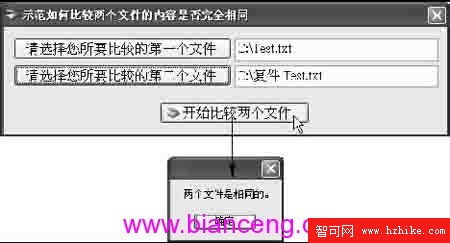
圖 1-34 為 CH1_DemoForm044.cs 執行畫面,示範呼叫 FileCompare 函式比較兩個檔案。
private void btnGoToCompare_Click(object sender, EventArgs e)
{
    if (FileCompare(this.TextBox1.Text, this.TextBox2.Text))
    {
        MessageBox.Show("兩個檔案是相同的。");
    }
    else
    {
        MessageBox.Show("兩個檔案並不相同。");
    }
}

///
/// 比較兩個檔案內容是否完全相同
///
/// 第一個檔案路徑
/// 第二個檔案路徑
/// 相同傳回 true,否則 false
private bool FileCompare(string file1, string file2)
{
    // 判斷是否為同一檔案參考
    if (file1 == file2) return true;

    int file1byte = 0, file2byte = 0;
    using (FileStream fs1 = new FileStream(file1, FileMode.Open),
                      fs2 = new FileStream(file2, FileMode.Open))
    {
        // 檢查檔案大小
        if (fs1.Length != fs2.Length)
        {
            return false;
        }

        // 逐位元組比較
        do
        {
            file1byte = fs1.ReadByte();
            file2byte = fs2.ReadByte();
        } while ((file1byte == file2byte) && (file1byte != -1));
    }

    // 只有完全相同才會相等
    return (file1byte - file2byte) == 0;
}
此實作使用 FileStream.ReadByte 逐一讀取位元組,配合 using 確保串流正確關閉,適合中小型檔案比對。