ComboBox 預設僅顯示 DisplayMember 單一欄位。透過 Format 事件,可在繫結每一項目前動組合多欄位文字。
private void comboBox1_Format(object sender, ListControlConvertEventArgs e)
{
    DataRowView row = e.ListItem as DataRowView;
    if (row != null)
    {
        e.Value = string.Format("{0} - {1} - {2:yyyy/MM/dd} - {3:NT$#,##0.00}",
            row["姓名"], row["性別"], row["出生日期"], row["目前薪資"]);
    }
}
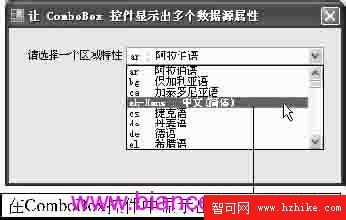
圖 3-45:CH3_DemoForm029 執行畫面
private void Form_Load(object sender, EventArgs e)
{
    culturesCB.ValueMember = "LCID";
    culturesCB.DataSource = CultureInfo.GetCultures(CultureTypes.FrameworkCultures);
}
private void culturesCB_Format(object sender, ListControlConvertEventArgs e)
{
    CultureInfo ci = e.ListItem as CultureInfo;
    if (ci != null)
        e.Value = string.Format("{0} : {1}", ci.IetfLanguageTag, ci.DisplayName);
}
ListControlConvertEventArgs.ListItem 為原始資料項目 (DataRowView、CultureInfo 等)e.Value 指定 **下拉清單中顯示的文字**,不影響 ValueMember 實際值string.Format 支援日期/數值/貨幣等標準/自訂格式字串ValueMember + DataSource + Format 事件,**無需自訂繪製**