開發一套具備 定時關機、倒數關機、關機提醒、系統資訊查詢 四大功能的工具,關機時間精確到秒,同時作為 C# 呼叫 Win32 API (P/Invoke) 的入門範例。
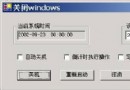
新增標準 Windows Forms 專案,表單名稱 frmmain,標題「關閉 Windows」。拖曳下列元件並設定屬性:
| 元件 | 名稱 | Text / 關鍵屬性 |
|---|---|---|
| CheckBox | checkBox1 | 自動關機 |
| CheckBox | checkBox2 | 倒計時執行操作 |
| CheckBox | checkBox3 | 定時報警 |
| GroupBox | groupBox1 | 當前系統時間 |
| GroupBox | groupBox2 | 設定時間 |
| TextBox | txtTime | 顯示倒數秒數 |
| Button | butCancle | 取消 |
| Button | butReOpen | 重新啟動 |
| Button | butClose | 關機 |
| Button | butReLogin | 注銷 |
| Button | butSysInto | 系統資訊 |
| DateTimePicker | setupTime | Format = Time |
| DateTimePicker | setupDate | Format = Short |
| Timer | timer1 | Interval = 100 (0.1 秒) |
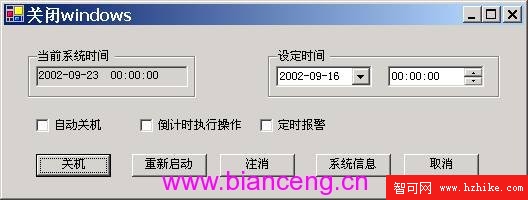
using System.Runtime.InteropServices;
using System.Text; // StringBuilder
// 取得 Windows 目錄
[DllImport("kernel32.dll", CharSet = CharSet.Auto)]
public static extern uint GetWindowsDirectory(StringBuilder lpBuffer, uint uSize);

// 取得系統目錄
[DllImport("kernel32.dll", CharSet = CharSet.Auto)]
public static extern uint GetSystemDirectory(StringBuilder lpBuffer, uint uSize);

// 關機/重開機/登出
[DllImport("user32.dll", ExactSpelling = true)]
public static extern int ExitWindowsEx(uint uFlags, uint dwReserved);

// 關於視窗 (範例)
[DllImport("shell32.dll")]
public static extern int ShellAbout(int hWnd, string szApp, string szOtherStuff, int hIcon);
const int SHUTDOWN = 1;   // 關機
const int REBOOT = 2;     // 重開機
const int LOGOFF = 0;     // 登出
uint dwReserved = 0;
uint sh = 0;
int counter = 0, n = 0;
private void frmmain_Load(object sender, EventArgs e)
{
    Time.Text = DateTime.Now.ToShortDateString() + " " + DateTime.Now.ToLongTimeString();
}
private void timer1_Tick(object sender, EventArgs e)
{
    string currDate = DateTime.Now.ToShortDateString();
    string currTime = DateTime.Now.ToShortTimeString();

    // 即時顯示系統時間 (假設有一個 Label 名為 lblSysTime)
    lblSysTime.Text = currDate + " " + currTime;

    // 定時關機檢查
    if (checkBox1.Checked) // 自動關機
    {
        if (currDate == setupDate.Value.ToShortDateString() &&
            currTime == setupTime.Value.ToShortTimeString())
        {
            CloseComputer();
        }
    }

    // 倒數關機邏輯 (略)
}
private void CloseComputer() { sh = ExitWindowsEx(SHUTDOWN, dwReserved); }
private void RebootComputer() { sh = ExitWindowsEx(REBOOT, dwReserved); }
private void LogoffUser() { sh = ExitWindowsEx(LOGOFF, dwReserved); }
private void butReOpen_Click(object s, EventArgs e) { RebootComputer(); }
private void butReLogin_Click(object s, EventArgs e) { LogoffUser(); }
private void butClose_Click(object s, EventArgs e) { CloseComputer(); }
private void butCancle_Click(object s, EventArgs e) { this.Close(); }
private void butSysInto_Click(object s, EventArgs e) { new Form2().Show(); } // 開啟系統資訊視窗
下一篇將詳細說明 Form2 系統資訊視窗的 API 呼叫與結構體定義。