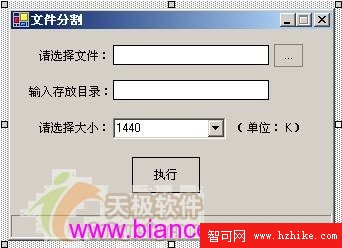
| 元件 | 名稱 | 屬性 | 值 |
|---|---|---|---|
| Button | button1 | FlatStyle | Flat |
| Text | 執行 | ||
| Button | button2 | FlatStyle | Popup |
| Text | ... | ||
| Form | Form1 | Text | 檔案分割 |
| MaximizeBox | False | ||
| MinimizeBox | True | ||
| FormBorderStyle | FixedSingle | ||
| ComboBox | comboBox1 | Items | 720, 1440, 2880 (KB) |
| Label | label1 | Text | 請選擇大小: |
| Label | label2 | Text | 請選擇檔案: |
| Label | label3 | Text | 輸入存放目錄: |
| Label | label4 | Text | (單位:KB) |
| TextBox | textBox1 | Text | (空) |
| TextBox | textBox2 | Text | (空) |
using System;
using System.Drawing;
using System.Collections;
using System.ComponentModel;
using System.Windows.Forms;
using System.Data;
using System.IO;
using System.Text;
using System.Data.OleDb;
using System.Windows.Forms.Design;private void button2_Click(object sender, EventArgs e)
{
openFileDialog1.Title = "請選擇要分割的檔案名稱";
DialogResult result = openFileDialog1.ShowDialog();
if (result == DialogResult.OK && openFileDialog1.FileName != string.Empty)
{
textBox1.Text = openFileDialog1.FileName;
button1.Enabled = true; // 啟用分割按鈕
}
}分割執行核心邏輯實作與執行驗證畫面。