目前處理:每次換片清除原 9 片再加新 9 片,較笨但簡單。優化兩法:1) 判斷移動方向只換 3 片;2) 全載入只顯示當前 9 片,其餘 Visibility.Collapsed 不參與佈局。
輔助執行緒間隔檢測主角切片位置(間隔導致區域轉換偶現白邊,不可接受可放入畫面 Loop 即時判斷):
leaderSectionX = (int)(Leader.X / mapSectionWidth);
leaderSectionY = (int)(Leader.Y / mapSectionHeight);
運行發現切片邊緣顯示縫隙:
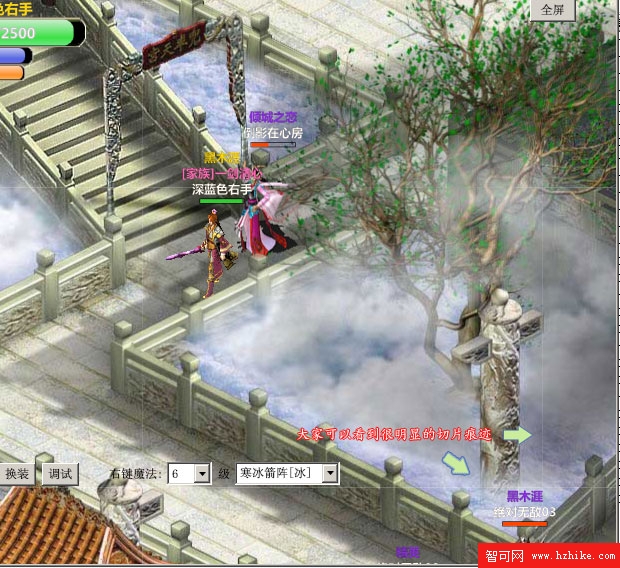
PS 重新對接實為完美吻合,問題在切片渲染。處理:每片寬高各加 1:
mapSection = new Image()
{
    Source = Super.getImage(string.Format("Map/{0}/Surface/{1}_{2}.jpg", mapCode.ToString(), x, y)),
    Width = mapSectionWidth + 1,
    Height = mapSectionHeight + 1,
    Stretch = Stretch.Fill,
};
修改後移動到右下角出現兩片白色無圖區域:
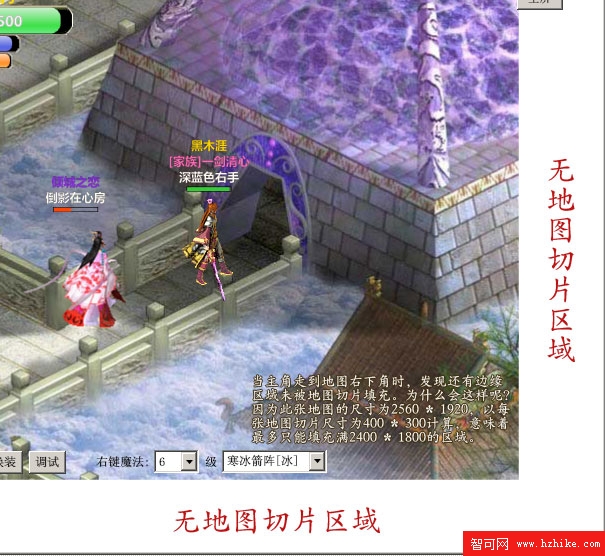
原因:編輯器按比例切割,示例地圖 2560×1920,以 400×300 單位僅切 2400×1800 區域。處理:規範地圖尺寸為切片尺寸整倍數,或邏輯呈現非標準邊緣片。
地圖自適應區域載入實現,大地圖效能優勢明顯。下節講解地圖切換與傳送。