using System;
using System.Drawing;
using System.Collections;
using System.ComponentModel;
using System.Windows.Forms;
using System.Data;
using System.IO;
using System.Text;
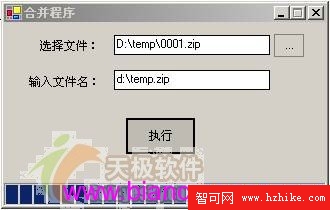
using System.Data.OleDb;public string sDirectoryName = ""; // 合併檔案所在目錄private void button2_Click(object sender, EventArgs e)
{
openFileDialog1.Title = "請選擇要合併的第一個檔案";
if (openFileDialog1.ShowDialog() == DialogResult.OK
&& openFileDialog1.FileName != "")
{
textBox1.Text = openFileDialog1.FileName;
}
// 解析目錄路徑
string[] path = openFileDialog1.FileName.Split('\\');
string dir = "";
for (int i = 0; i < path.Length - 1; i++)
dir += path[i] + "\\";
button1.Enabled = true;
sDirectoryName = dir;
}private void button1_Click(object sender, EventArgs e)
{
string[] files = Directory.GetFiles(sDirectoryName);
int count = files.Length;
progressBar1.Maximum = count;
using (FileStream outFs = new FileStream(textBox2.Text, FileMode.OpenOrCreate))
using (BinaryWriter writer = new BinaryWriter(outFs))
{
for (int i = 0; i < count; i++)
{
using (FileStream inFs = new FileStream(files[i], FileMode.Open))
using (BinaryReader reader = new BinaryReader(inFs))
{
writer.Write(reader.ReadBytes((int)inFs.Length));
}
progressBar1.Value = i + 1;
}
}
MessageBox.Show("成功合併!");
progressBar1.Value = 0;
}
Visual C# 檔案處理能力源自
System.IO命名空間。分割合併屬較複雜的檔案編程應用,核心僅需三大類:
- FileStream:檔案位元組串流存取
- BinaryReader:二進位資料讀取
- BinaryWriter:二進位資料寫入
掌握這三類即掌握檔案編程精髓。其他類別或用法相似、或結構更簡單。希望本系列助您精通 C# 檔案編程。