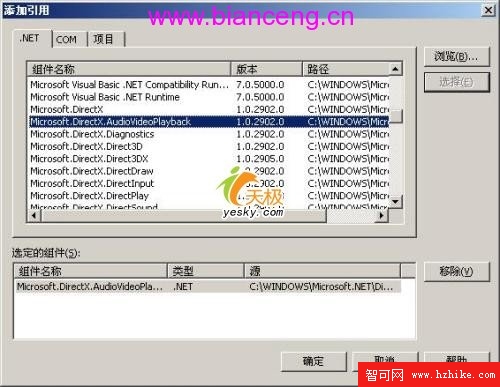
專案右鍵「加入參考」→ .NET 頁面選 Microsoft.DirectX.AudioVideoPlayback:
OpenFileDialog:選擇視訊檔 (預設 *.avi)。Panel:視訊播放宿主容器 (Dock=Top, 540×346)。using System;
using System.Drawing;
using System.Collections;
using System.ComponentModel;
using System.Windows.Forms;
using System.Data;
using Microsoft.DirectX.AudioVideoPlayback; // 關鍵命名空間private Video MyVideo = null; // 視訊播放核心物件private void InitializeComponent()
{
this.panel1 = new Panel();
this.button1 = new Button(); // 開啟
this.button2 = new Button(); // 播放
this.button3 = new Button(); // 暫停
this.button4 = new Button(); // 停止
this.openFileDialog1 = new OpenFileDialog();
this.SuspendLayout();
// panel1
this.panel1.Dock = DockStyle.Top;
this.panel1.Location = new Point(0, 0);
this.panel1.Name = "panel1";
this.panel1.Size = new Size(540, 346);
this.panel1.TabIndex = 0;
// button1
this.button1.Location = new Point(62, 380);
this.button1.Name = "button1";
this.button1.Size = new Size(80, 38);
this.button1.TabIndex = 1;
this.button1.Text = "開啟";
this.button1.Click += new EventHandler(this.button1_Click);
// button2
this.button2.Location = new Point(165, 380);
this.button2.Name = "button2";
this.button2.Size = new Size(81, 38);
this.button2.TabIndex = 1;
this.button2.Text = "播放";
this.button2.Click += new EventHandler(this.button2_Click);
// button3
this.button3.Location = new Point(268, 380);
this.button3.Name = "button3";
this.button3.Size = new Size(80, 38);
this.button3.TabIndex = 1;
this.button3.Text = "暫停";
this.button3.Click += new EventHandler(this.button3_Click);
// button4
this.button4.Location = new Point(371, 380);
this.button4.Name = "button4";
this.button4.Size = new Size(81, 38);
this.button4.TabIndex = 1;
this.button4.Text = "停止";
this.button4.Click += new EventHandler(this.button4_Click);
// openFileDialog1
this.openFileDialog1.DefaultExt = "avi";
this.openFileDialog1.Filter = "視訊檔案|*.avi||";
this.openFileDialog1.Title = "請選擇播放的 AVI 檔案";
// Form1
this.AutoScaleBaseSize = new Size(6, 14);
this.ClientSize = new Size(540, 461);
this.Controls.AddRange(new Control[] { this.button1, this.panel1, this.button2, this.button3, this.button4 });
this.FormBorderStyle = FormBorderStyle.FixedDialog;
this.MaximizeBox = false;
this.Name = "Form1";
this.Text = "Visual C#中使用DirectX實現媒體播放";
this.Load += new EventHandler(this.Form1_Load);
this.ResumeLayout(false);
}設計介面預覽:
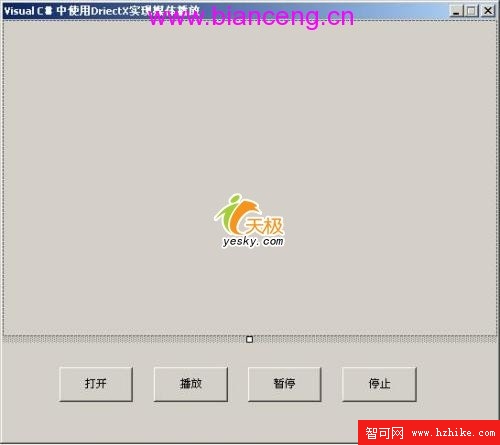
圖 03:介面設計完成畫面