3、有條件地控制資料輸出
輸出資料時,並非簡單輸出所有資料,而是根據外部許多條件組合獲取部分資料。對於這些外部條件,若可固定,則可在設計 VT 模板時寫入標籤(建議是 <vt:template>)的屬性裡,這樣程式碼裡就能獲取這些條件並處理資料。
例如博客園新聞頻道右側的「相關新聞」、「熱點新聞」兩欄資料:
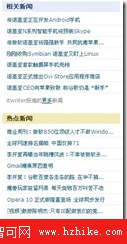
假設「相關新聞」獲取屬於 relating 類型新聞,「熱點新聞」獲取 hoting 類型,則可設計 VT 模板如下:
<div class="side_block">
  <h3 class="title_blue">相關新聞</h3>
  <vt:template name="topnews" type="relating" file="cnblogs_newsdata.html" />
</div>
<div class="side_block">
  <h3 class="title_yellow">熱點新聞</h3>
  <vt:template name="topnews" type="hoting" file="cnblogs_newsdata.html" />
</div>
定義兩個 name="topnews" 的 <vt:template>,便於程式碼統一處理(資料相同,只條件不同)。自訂屬性 type 用於資料獲取條件。包含檔案 cnblogs_newsdata.html 的 VT 模板如下:
<ul class="topnews block_list bt">
  <vt:foreach from="#.newsdata" item="news" index="i" id="newslist">
    <li>
      <a href="{$:#.news.url}" title="{$:#.news.title htmlencode='true'}">{$:#.news.title htmlencode='true'}...</a>
    </li>
  </vt:foreach>
</ul>
定義 id="newslist" 的 <vt:foreach>,便於程式碼控制新聞輸出與處理每條新聞訪問地址(即 {$:#.news.url} 變數運算式的值)。
示例程式碼:
// 獲取所有名稱為 topnews 的模板塊
ElementCollection<Template> templates = this.Document.GetChildTemplatesByName("topnews");
foreach (Template template in templates)
{
    // 根據模板塊裡定義的 type 屬性條件取得新聞資料
    List<News> newsData = GetNewsData(template.Attributes.GetValue("type"));
    // 設定變數 newsdata 的值
    template.Variables.SetValue("newsdata", newsData);
    // 取得模板塊下 Id 為 newslist 的標籤
    Tag tag = template.GetChildTagById("newslist");
    if (tag is ForEachTag)
    {
        // 設定 BeforeRender 事件用於設定變數運算式 {$:#.news.url} 的值
        tag.BeforeRender += (sender, e) =>
        {
            ForEachTag t = (ForEachTag)sender;
            // 取得當前項的值(因為 foreach 資料源是 List<News>,所以當前項型別為 News 實體)
            News news = (News)t.Item.Value;
            // 設定當前項的變數運算式值,即 {$:#.news.url}
            t.Item.SetExpValue("url", GetNewsUrl(news));
        };
    }
}
使用 BeforeRender 事件,此事件在標籤元素資料呈現前觸發。對於迴圈元素 <vt:foreach> 和 <vt:for>,每次迴圈都會呈現資料,導致每次迴圈都觸發此事件(含 AfterRender),所以可透過此事件獲取迴圈當前項的值。
具體示例程式碼請參考:https://net-vtemplate.googlecode.com/svn/src/VTemplate.WebTester/cnblogs_newslist.ashx.cs