Table 類別是 DLINQ 中定義的,這裡用了泛型概念,類似 C++ 模板。但 C# 和 C++ 有區別:C++ 泛型模板類似替換,編譯時用實際類型替換,故對任何類型都可;但 C# 泛型是在虛擬機層級實現,編譯時會進行類型檢查。Order、Product、OrderDetail 等都是 sqlmetal 程式根據資料庫對應表自動產生的類別。也就是 class 與 table 一一對應,恰好實現 object 與 data 的對等。讓我們看看 Order 定義(僅貼部分):
[Table(Name = "Orders")]
public partial class Order : System.Data.DLinq.INotifyPropertyChanging, System.ComponentModel.INotifyPropertyChanged
{
    private int _OrderID;
    private string _CustomerID;
    private System.Nullable<int> _EmployeeID;
    …………

    public Order()
    {
        this._OrderID = default(int);
        this._OrderDetails = new EntitySet<OrderDetail>(
            new Notification<OrderDetail>(this.attach_OrderDetails),
            new Notification<OrderDetail>(this.detach_OrderDetails));
        this._Customer = default(EntityRef<Customer>);
        this._Employee = default(EntityRef<Employee>);
        this._Shipper = default(EntityRef<Shipper>);
    }

    [Column(Storage = "_OrderID", DBType = "Int NOT NULL IDENTITY", IsPrimaryKey = true, IsDBGenerated = true)]
    public int OrderID
    {
        get { return this._OrderID; }
    }
}
因對應檔案是自動產生,不需手動製作,節省大量勞動力。這裡看到 Order 類別必須從兩個介面繼承,並實作介面定義的方法。定義一些私有變數,似乎與資料表欄位無關。其實在 Property 裡描述。DLINQ 會為每個資料表欄位定義對應 Property,並在其上加上 Attribute,如:
[Column(Storage = "_OrderID", DBType = "Int NOT NULL IDENTITY", IsPrimaryKey = true, IsDBGenerated = true)]
用來描述該 Property 對應資料表哪個欄位(Storage)、型別(DBType)、是否主鍵(IsPrimaryKey)、是否自增(IsDBGenerated)等。暫時先別修改此檔案,等熟悉後可用它自定義繼承(如 Product 下還有很多種 Product)。進階會介紹。
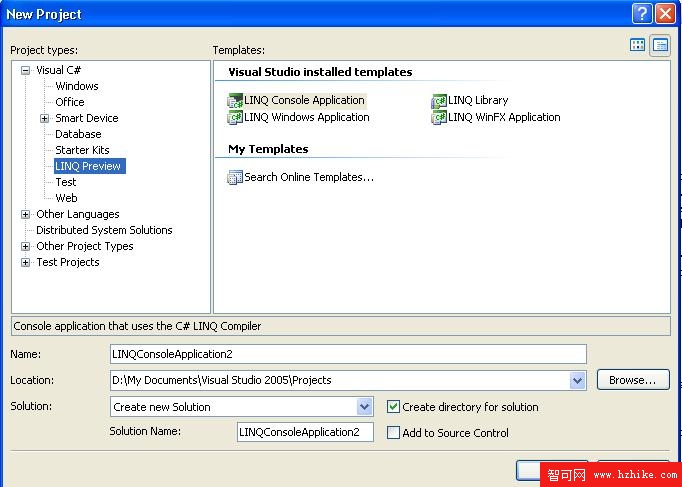
有了對應檔案後,您是否躍躍欲試想建立自己的 LINQ 專案?安裝 LINQ Preview 後,選擇 File -> New -> Project,會發現比平時多了個選項。