在將 WPF 遊戲引擎移植至 Silverlight 3.0 的過程中,我們遇到了幾項關鍵技術挑戰,主要集中在右鍵選單實現、座標系統重構與動畫優化三個方面。本文將詳細記錄這些改進的技術細節與權衡考量。
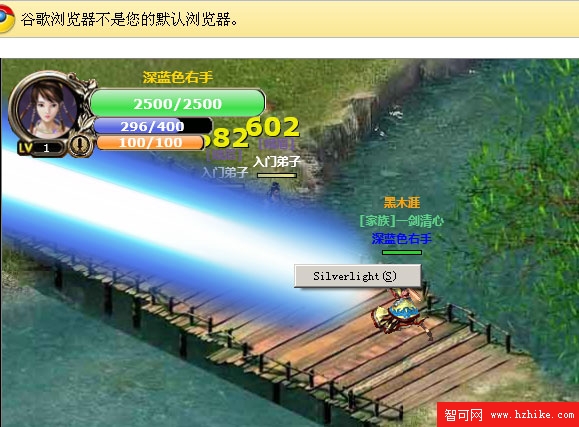
Silverlight 預設不支援滑鼠右鍵事件,必須透過 HTML DOM 橋接來實現。核心程式碼如下:
// 註冊右鍵事件
HtmlPage.Document.AttachEvent("oncontextmenu", Game_MouseRightButtonDown);

// 滑鼠右鍵事件處理
private void Game_MouseRightButtonDown(object sender, HtmlEventArgs e) {
    e.PreventDefault(); // 取消預設右鍵選單
    // ... 遊戲邏輯處理
}
此方法需搭配 <param name="Windowless" value="true" /> 或 System.Windows.Interop.Settings.Windowless = true 才能生效。但需謹慎評估代價:
綜上所述,在 Silverlight 3.0 中使用右鍵功能需審慎評估。
原先精靈類別使用獨立的 X、Y、Z 關聯屬性定位,現重構為單一 Coordinate 屬性(類型為 Point),完整定義如下:
///
/// 獲取或設置控件座標(關聯屬性)
///
public Point Coordinate {
    get { return (Point)GetValue(CoordinateProperty); }
    set { SetValue(CoordinateProperty, value); }
}

public static readonly DependencyProperty CoordinateProperty = DependencyProperty.Register(
    "Coordinate",
    typeof(Point),
    typeof(QXSprite),
    new PropertyMetadata(ChangeCoordinateProperty)
);

private static void ChangeCoordinateProperty(DependencyObject d, DependencyPropertyChangedEventArgs e) {
    QXSprite obj = (QXSprite)d;
    if (obj.Visibility == Visibility.Visible) {
        Point p = (Point)e.NewValue;
        obj.SetValue(Canvas.LeftProperty, p.X - obj.CenterX);
        obj.SetValue(Canvas.TopProperty, p.Y - obj.CenterY);
        obj.SetValue(Canvas.ZIndexProperty, Convert.ToInt32(p.Y));
    }
}
此改進帶來雙重優勢:
Coordinate = new Point(x, y)DoubleAnimation 替換為 PointAnimation,減少動畫物件數量關聯屬性的值變更自動觸發 ChangeCoordinateProperty,同步更新 Canvas.Left、Canvas.Top 與 Canvas.ZIndex,展現關聯屬性系統的強大威力。