地圖牽引時 Canvas.GetLeft(Map)、Canvas.GetTop(Map) 即時更新。已知角色在地圖上的座標 (Spirit.X, Spirit.Y),視窗座標 = 角色地圖座標 + 地圖偏移:
視窗X = Spirit.X + Canvas.GetLeft(Map)
視窗Y = Spirit.Y + Canvas.GetTop(Map)
int scrollspeed = 3;
private void Timer_Tick(object sender, EventArgs e) {
    double mapleft = Canvas.GetLeft(Map);
    double maptop = Canvas.GetTop(Map);
    ......
    // 主角跟隨
    Canvas.SetLeft(Spirit, Spirit.X + mapleft);
    Canvas.SetTop(Spirit, Spirit.Y + maptop);
    // 障礙物同步(測試用)
    foreach (UIElement uie in Carrier.Children)
        if (uie is Rectangle) {
            Rectangle r = uie as Rectangle;
            Point p = getPointFromTag(r.Tag);
            Canvas.SetLeft(r, mapleft + p.X * GridSize);
            Canvas.SetTop(r, maptop + p.Y * GridSize);
        }
}
黃色代碼為核心公式應用。障礙物同步僅測試用,實際不需。
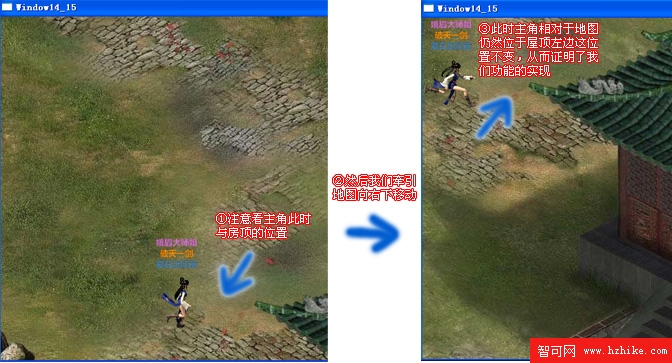
地圖、主角、障礙物同步移動效果。
未實現牽引模式下滑鼠點擊行走、且行走中牽引地圖仍正確顯示。涉及多座標系換算,留待下節解決。