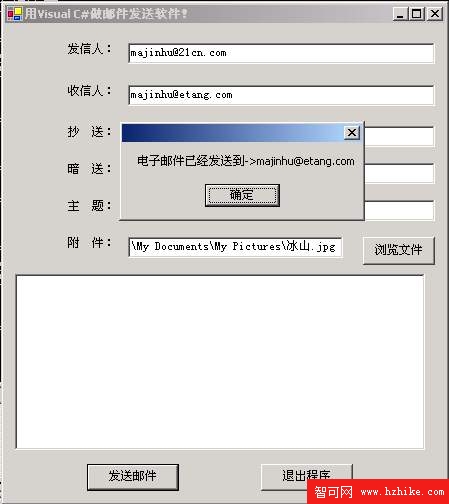
using System;
using System.Drawing;
using System.Collections;
using System.ComponentModel;
using System.Windows.Forms;
using System.Data;
using System.Web;
using System.Web.Mail;

public class Form1 : Form {
  // 控件宣告
  Label lblFrom, lblTo, lblSubject, lblCC, lblBCC, lblAttach;
  TextBox txtFrom, txtTo, txtSubject, txtCC, txtBCC, txtAttach, txtBody;
  Button btnSend, btnExit, btnBrowse;
  OpenFileDialog dlgOpen;
  Container components = null;

  public Form1() { InitializeComponent(); }

  protected override void Dispose(bool disposing) {
    if (disposing && components != null) components.Dispose();
    base.Dispose(disposing);
  }

  void InitializeComponent() {
    // ... 所有控件初始化、位置、大小、TabIndex、事件綁定 ...
    // 關鍵綁定:
    btnBrowse.Click += new EventHandler(btnBrowse_Click);
    btnSend.Click += new EventHandler(btnSend_Click);
    btnExit.Click += new EventHandler(btnExit_Click);
  }

  [STAThread]
  static void Main() { Application.Run(new Form1()); }

  // 發送按鈕核心邏輯
  void btnSend_Click(object sender, EventArgs e) {
    try {
      MailMessage msg = new MailMessage();
      msg.From = txtFrom.Text;
      msg.To = txtTo.Text;
      msg.Cc = txtCC.Text;
      msg.Bcc = txtBCC.Text;
      msg.Subject = txtSubject.Text;
      msg.Body = txtBody.Text;
      if (txtAttach.Text.Length > 0)
        msg.Attachments.Add(new MailAttachment(txtAttach.Text, MailEncoding.Base64));
      SmtpMail.Send(msg);
      MessageBox.Show("郵件已發送至 → " + txtTo.Text);
    } catch (Exception ex) {
      MessageBox.Show(ex.Message);
    }
  }

  void btnExit_Click(object sender, EventArgs e) { Application.Exit(); }

  void btnBrowse_Click(object sender, EventArgs e) {
    if (dlgOpen.ShowDialog() == DialogResult.OK)
      txtAttach.Text = dlgOpen.FileName;
  }
}
MailAttachment 使用。try/catch 捕獲 SMTP 連線失敗、認證錯誤、附件不存在等錯誤,友善提示使用者。利用 .NET Framework 豐富的 System.Web.Mail 類別庫,僅需少量代碼即可構建功能完備的郵件發送用戶端。掌握框架類庫精髓,是 C# 高效開發的關鍵。