函式即可完成特定功能、可重複執行代碼區塊。面向物件過程中,函式即方法別稱。函式提高代碼可讀性、可建立多用途代碼。從淺入深學習,先看最簡單函式。
static void Hello() // 無回傳值、無參數函式
{
    Console.WriteLine("hello,everyone");
    Console.WriteLine("呼叫函式");
    Console.ReadKey();
}
static void Main(string[] args)
{
    Hello(); // 呼叫函式
    Hello(); // 第二次呼叫
}
輸出:
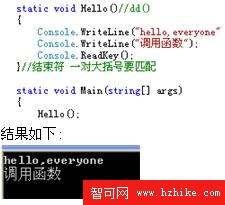
Hello() 最簡單,無回傳值、無參數,功能輸出兩句話。函式可重複執行,只要在特定地方呼叫即可多次執行。
呼叫時需匹配參數。形式:static void 函式名稱(參數型別 參數名稱)。範例:
static void hi(string name)
{
    Console.WriteLine("帶參數函式: hello, {0}", name);
}
輸出:
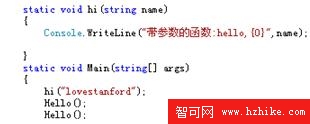
若呼叫 hi(123); 編譯錯誤:引數不匹配。有參數函式呼叫時特別注意參數匹配。
實際應用較廣。形式:回傳型別 函式名稱(參數型別 參數名稱)。範例:
static int MaxNum(int[] a)
{
    int max = a[0];
    for (int i = 1; i < a.Length; i++)
        if (max < a[i]) max = a[i];
    return max;
}
static void Main(string[] args)
{
    int[] aa = { 1, 5, 7, 5, 3, 3, 44, 7 };
    int biggest = MaxNum(aa);
    Console.WriteLine("aa 中最大數 {0}", biggest);
}
執行結果:
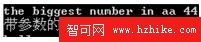
同專案中函式名稱相同但參數不同。範例:
static void hi(string name) { Console.WriteLine("hi(string): hello, {0}", name); }
static void hi(int name) { Console.WriteLine("hi(int): I have {0} apples", name); }
static void Main(string[] args) { hi(12); hi("12"); }
執行結果:
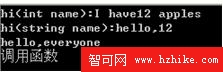
函式知識暫介紹至此,後續將詳細介紹 Main() 函式。請大家編程體會上述函式類型。