本系列教程多為 C# 控制台應用程式。Console 中文即控制台。資料庫與網路應用後續介紹。先看第一個 C# 程式。
在「檔案」→「新增」→「專案」中選擇「控制台應用程式」,語言選 C#。
using System;
using System.Collections.Generic;
using System.Text;
// 命名空間,提供特定類別,使您能與系統進程、事件日誌、效能計數器互動。
// 命名空間作用後續介紹
namespace ConsoleApplication1
{
    class Program
    {
        static void Main(string[] args) // 系統主函式,程式執行起點
        {
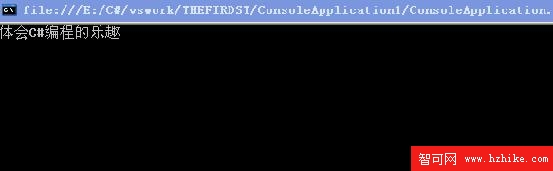
            Console.WriteLine("體會 C# 程式設計樂趣"); // 輸出並換行
            Console.ReadKey(); // 保持控制台視窗直到使用者按任意鍵結束
        }
    }
}
按 F5 執行結果:
Windows 應用程式是 C# 提供 GUI (圖形使用者介面) 功能,使人機溝通。在「檔案」→「新增」→「專案」選擇「Windows 應用程式」,語言選 C#。下面簡單 GUI 設計,若無後台事件處理,點擊「點擊我」不會有變化。
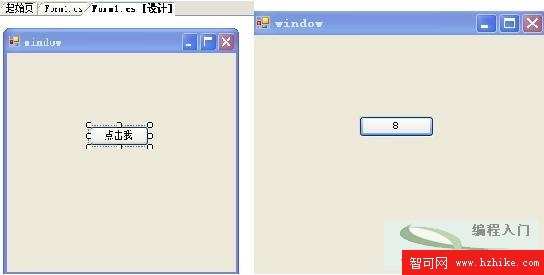
系統代碼:
using System;
using System.Collections.Generic;
using System.ComponentModel;
using System.Data;
using System.Drawing;
using System.Text;
using System.Windows.Forms;

namespace window
{
    public partial class Form1 : Form
    {
        int count = 0; // 點擊次數計數
        public Form1()
        {
            InitializeComponent(); // 初始化
        }
        private void button1_Click(object sender, EventArgs e) // 點擊事件處理
        {
            count++; // 每點擊一次計數加 1
            button1.Text = count.ToString(); // 型別轉換
        }
    }
}
本節主要學習建立簡單控制台應用程式、啟動與執行 Windows 應用程式,請讀者自行嘗試。