用戶端不需監聽網路,呼叫無阻塞,故不需額外執行緒,與伺服器端不同。
using System;
using System.Drawing;
using System.Collections;
using System.ComponentModel;
using System.Windows.Forms;
using System.Data;
using System.Net.Sockets;
using System.IO;
using System.Threading;

public class Form1 : Form
{
    private ListBox ListBox1;
    private Label label1, label2;
    private TextBox textBox1;
    private Button button3;
    private NetworkStream networkStream;
    private StreamReader streamReader;
    private StreamWriter streamWriter;
    private TcpClient myClient;
    private Container components = null;

    public Form1() { InitializeComponent(); }

    protected override void Dispose(bool disposing)
    {
        if (disposing && components != null) components.Dispose();
        base.Dispose(disposing);
    }

    private void InitializeComponent()
    {
        label1 = new Label(); button3 = new Button();
        ListBox1 = new ListBox(); textBox1 = new TextBox(); label2 = new Label();
        SuspendLayout();
        label1.Location = new Point(8, 168); label1.Name = "label1";
        label1.Size = new Size(56, 23); label1.TabIndex = 3; label1.Text = "訊息:";
        AutoScaleBaseSize = new Size(6, 14);
        ClientSize = new Size(424, 205);
        Controls.Add(button3); Controls.Add(textBox1); Controls.Add(label1);
        Controls.Add(label2); Controls.Add(ListBox1);
        MaximizeBox = false; MinimizeBox = false;
        Name = "Form1"; Text = "C# 網路程式用戶端!";
        Closed += new EventHandler(Form1_Closed);
        ResumeLayout(false);

        try
        {
            myClient = new TcpClient("localhost", 1234);
        }
        catch { MessageBox.Show("無法連接伺服器!"); return; }

        networkStream = myClient.GetStream();
        streamReader = new StreamReader(networkStream);
        streamWriter = new StreamWriter(networkStream);
    }

    static void Main() { Application.Run(new Form1()); }

    private void button3_Click(object sender, EventArgs e)
    {
        if (textBox1.Text == "") { MessageBox.Show("請輸入訊息!"); textBox1.Focus(); return; }
        try
        {
            streamWriter.WriteLine(textBox1.Text);
            streamWriter.Flush();
            string s = streamReader.ReadLine();
            ListBox1.Items.Add("讀取伺服器回應:" + s);
        }
        catch (Exception ex) { MessageBox.Show("讀取錯誤:" + ex.ToString()); }
    }

    private void Form1_Closed(object sender, EventArgs e)
    {
        streamReader.Close(); streamWriter.Close(); networkStream.Close();
    }
}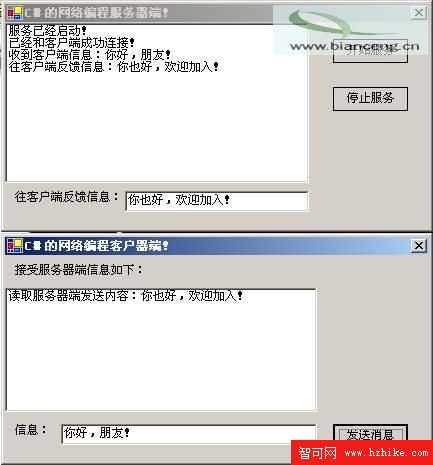
圖01:C# 網路程式執行介面
.NET Framework 僅以 System.Net、System.Net.Sockets 兩命名空間封裝豐富網路功能,支援同步/非同步、阻塞/非阻塞。本文以資料傳輸程式展示基礎用法,進階功能留待讀者探索。