CreateDC("DISPLAY", ...)Graphics 物件BitmapBitBlt 將螢幕內容複製至 Bitmapusing System;
using System.Drawing;
using System.Collections;
using System.ComponentModel;
using System.Windows.Forms;
using System.Data;
using System.Drawing.Imaging;
using System.IO;
using System.Runtime.InteropServices;
public class Capture : Form
{
private Container components = null;
private Icon mNetTrayIcon = new Icon("Tray.ico");
private Bitmap MyImage = null;
private NotifyIcon TrayIcon;
private ContextMenu notifyiconMnu;
public Capture() { InitializeComponent(); }
protected override void OnActivated(EventArgs e) { Hide(); }
[DllImport("gdi32.dll")]
private static extern bool BitBlt(IntPtr hdcDest, int nXDest, int nYDest, int nWidth, int nHeight,
IntPtr hdcSrc, int nXSrc, int nYSrc, int dwRop);
[DllImport("gdi32.dll")]
private static extern IntPtr CreateDC(string lpszDriver, string lpszDevice, string lpszOutput, IntPtr lpInitData);
public void capture(object sender, EventArgs e)
{
Visible = false;
IntPtr dc1 = CreateDC("DISPLAY", null, null, IntPtr.Zero);
Graphics g1 = Graphics.FromHdc(dc1);
MyImage = new Bitmap(Screen.PrimaryScreen.Bounds.Width, Screen.PrimaryScreen.Bounds.Height, g1);
Graphics g2 = Graphics.FromImage(MyImage);
IntPtr dc3 = g1.GetHdc();
IntPtr dc2 = g2.GetHdc();
BitBlt(dc2, 0, 0, Screen.PrimaryScreen.Bounds.Width, Screen.PrimaryScreen.Bounds.Height, dc3, 0, 0, 13369376);
g1.ReleaseHdc(dc3);
g2.ReleaseHdc(dc2);
MyImage.Save("c:\\MyJpeg.jpg", ImageFormat.Jpeg);
MessageBox.Show("已將目前螢幕儲存至 C:\\MyJpeg.jpg!");
Visible = true;
}
public void ExitSelect(object sender, EventArgs e)
{
TrayIcon.Visible = false;
Close();
}
public override void Dispose()
{
base.Dispose();
if (components != null) components.Dispose();
}
private void InitializeComponent()
{
TrayIcon = new NotifyIcon();
TrayIcon.Icon = mNetTrayIcon;
TrayIcon.Text = "C# 螢幕截圖程式";
TrayIcon.Visible = true;
MenuItem[] mnuItms = new MenuItem[3];
mnuItms[0] = new MenuItem("擷取目前螢幕!");
mnuItms[0].Click += new EventHandler(capture);
mnuItms[1] = new MenuItem("-");
mnuItms[2] = new MenuItem("結束系統");
mnuItms[2].Click += new EventHandler(ExitSelect);
mnuItms[2].DefaultItem = true;
notifyiconMnu = new ContextMenu(mnuItms);
TrayIcon.ContextMenu = notifyiconMnu;
SuspendLayout();
AutoScaleBaseSize = new Size(5, 13);
ClientSize = new Size(320, 56);
ControlBox = false; MaximizeBox = false; MinimizeBox = false;
WindowState = FormWindowState.Minimized;
ShowInTaskbar = false;
Name = "capture";
Text = "C# 螢幕截圖程式!";
ResumeLayout(false);
}
static void Main() { Application.Run(new Capture()); }
}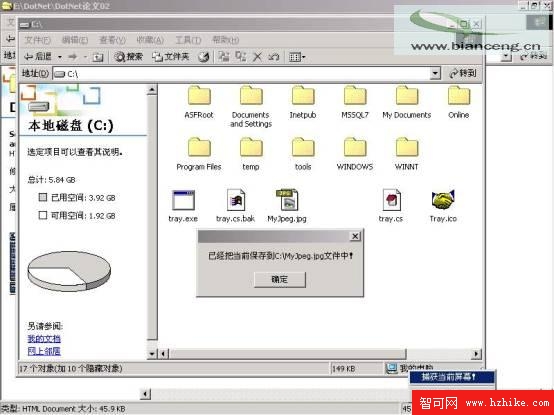
圖01:C# 螢幕截圖程式執行介面(常駐系統匣)
.NET Framework 功能豐富,但底層操作仍需呼叫 Win32 API。掌握 C# P/Invoke 呼叫 BitBlt、CreateDC 是關鍵。