BMP 為 DIB 格式,標頭含調色盤資訊,dDDesc1 已設定無需重複。RECT 控制顯示區域。BltFast 參數指定螢幕座標與來源矩形:
dDsurface.BltFast(0, 0, dDsurfaceSec, ref rect, DxVBLib.CONST_DDBLTFASTFLAGS.DDBLTFAST_WAIT);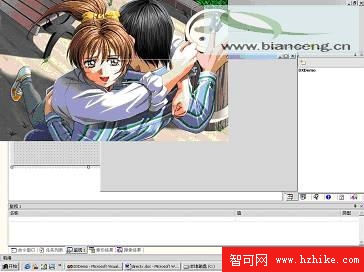
圖片超出 Form 區域,因 PrimarySurface 代表整個可見區域。
dx.GetWindowRect(this.Handle.ToInt32(), ref rectSec);
dDsurface.Blt(ref rectSec, dDsurfaceSec, ref rect, DxVBLib.CONST_DDBLTFLAGS.DDBLT_WAIT);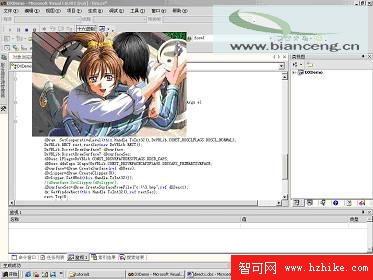
圖片限制在 Form 區域,但標題列被覆蓋。
dDclipper = dDraw.CreateClipper(0);
dDclipper.SetHWnd(this.Handle.ToInt32());
dDsurface.SetClipper(dDclipper);
Clipper 依視窗控制代碼裁剪,正確保留標題列:
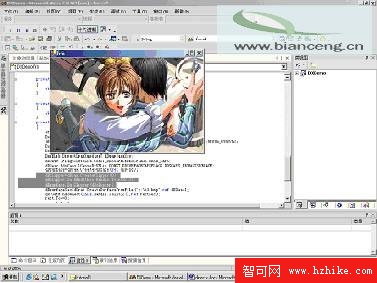
private void draw()
{
    dDraw = dx.DirectDrawCreate("");
    DxVBLib.DirectDrawClipper dDclipper;
    dDraw.SetCoOperativeLevel(this.Handle.ToInt32(), DxVBLib.CONST_DDSCLFLAGS.DDSCL_NORMAL);
    DxVBLib.RECT rect, rectSec = new DxVBLib.RECT();
    DxVBLib.DirectDrawSurface7 dDsurface, dDsurfaceSec;
    DxVBLib.DDSURFACEDESC2 dDDesc = new DxVBLib.DDSURFACEDESC2(), dDDesc1 = new DxVBLib.DDSURFACEDESC2();
    dDDesc.lFlags = DxVBLib.CONST_DDSURFACEDESCFLAGS.DDSD_CAPS;
    dDDesc.ddsCaps.lCaps = DxVBLib.CONST_DDSURFACECAPSFLAGS.DDSCAPS_PRIMARYSURFACE;
    dDsurface = dDraw.CreateSurface(ref dDDesc);
    dDclipper = dDraw.CreateClipper(0);
    dDclipper.SetHWnd(this.Handle.ToInt32());
    dDsurface.SetClipper(dDclipper);
    dDsurfaceSec = dDraw.CreateSurfaceFromFile("c:\\3.bmp", ref dDDesc1);
    dx.GetWindowRect(this.Handle.ToInt32(), ref rectSec);
    rect.Top = 0; rect.Left = 0;
    rect.Right = dDDesc1.lWidth; rect.Bottom = dDDesc1.lHeight;
    dDsurface.Blt(ref rectSec, dDsurfaceSec, ref rect, DxVBLib.CONST_DDBLTFLAGS.DDBLT_WAIT);
}