using System;
using System.Drawing;
using System.Windows.Forms;
using AgentObjects;

public class Hello : Form
{
    private Container components;
    private Button button2, button1;
    private TextBox textBox1;
    private AxAgentObjects.AxAgent AxAgent;
    private IAgentCtlCharacterEx Character;

    public Hello() { InitializeComponent(); }

    public static void Main(string[] args) { Application.Run(new Hello()); }

    private void InitializeComponent()
    {
        components = new Container();
        button1 = new Button();
        button2 = new Button();
        textBox1 = new TextBox();
        AxAgent = new AxAgentObjects.AxAgent();
        AxAgent.BeginInit();

        button2.Click += new EventHandler(button2_Click);
        button1.Location = new Point(88, 208);
        button1.BackColor = Color.FromArgb(255, 128, 128);
        button1.Size = new Size(152, 32);
        button1.TabIndex = 1;
        button1.Text = "載入角色";
        button2.Location = new Point(120, 240);
        button2.BackColor = Color.FromArgb(255, 128, 128);
        button2.Size = new Size(96, 24);
        button2.TabIndex = 2;
        button2.Text = "朗讀";
        textBox1.Location = new Point(48, 8);
        textBox1.Text = "";
        textBox1.Multiline = true;
        textBox1.TabIndex = 0;
        textBox1.Size = new Size(248, 200);
        textBox1.BackColor = Color.FromArgb(255, 128, 128);
        Text = "MSAGENT DEMO";
        AutoScaleBaseSize = new Size(5, 13);
        WindowState = FormWindowState.Maximized;
        BackColor = Color.FromArgb(255, 192, 192);
        ClientSize = new Size(344, 301);
        Controls.Add(button2);
        Controls.Add(button1);
        Controls.Add(textBox1);
        Controls.Add(AxAgent);
        button1.Click += new EventHandler(button1_Click);
        AxAgent.EndInit();
    }

    protected void button2_Click(object sender, EventArgs e)
    {
        if (textBox1.Text.Length == 0) return;
        Character.Speak(textBox1.Text, null);
    }

    protected void button1_Click(object sender, EventArgs e)
    {
        OpenFileDialog openFileDialog = new OpenFileDialog();
        openFileDialog.AddExtension = true;
        openFileDialog.Filter = "Microsoft Agent Characters (*.acs)|*.acs";
        openFileDialog.FilterIndex = 1;
        openFileDialog.RestoreDirectory = true;
        if (openFileDialog.ShowDialog() != DialogResult.OK) return;
        try { AxAgent.Characters.Unload("CharacterID"); } catch { }
        AxAgent.Characters.Load("CharacterID", (object)openFileDialog.FileName);
        Character = AxAgent.Characters["CharacterID"];
        Character.LanguageID = 0x409; // 英文
        Character.Show(null);
        Character.Play("announce");
        Character.Speak("welcome you sir", null);
    }
}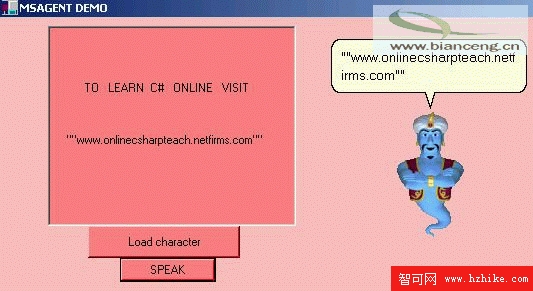
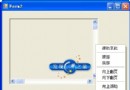
圖2
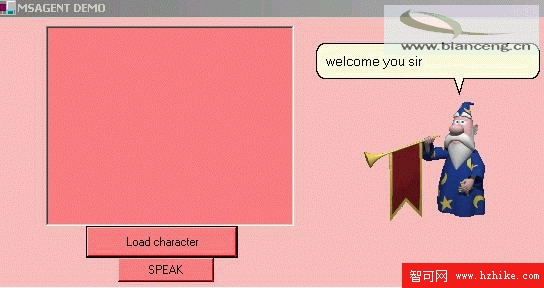
圖3
Microsoft Agent API 以 OLE Automation (COM) 服務形式提供動畫角色服務,支援多用戶端應用程式同時共用動畫、輸入、輸出服務。