using System;
using System.Drawing;
using System.Collections;
using System.ComponentModel;
using System.Windows.Forms;
using System.Data;
using System.Data.OleDb;

public class Form1 : Form
{
    private Button button1;
    private DataSet myDataSet;
    private DataGrid DataGrid1;
    private Container components = null;

    public Form1()
    {
        InitializeComponent();
        GetConnect();
    }

    protected override void Dispose(bool disposing)
    {
        if (disposing && components != null) components.Dispose();
        base.Dispose(disposing);
    }

    private void GetConnect()
    {
        string strCon = "Provider=Microsoft.Jet.OLEDB.4.0;Data Source=c:\\sample.xls;Extended Properties=Excel 8.0";
        OleDbConnection myConn = new OleDbConnection(strCon);
        string strCom = "SELECT * FROM [Sheet1$]";
        myConn.Open();
        OleDbDataAdapter myCommand = new OleDbDataAdapter(strCom, myConn);
        myDataSet = new DataSet();
        myCommand.Fill(myDataSet, "[Sheet1$]");
        myConn.Close();
    }

    private void InitializeComponent()
    {
        DataGrid1 = new DataGrid();
        button1 = new Button();
        SuspendLayout();
        DataGrid1.Name = "DataGrid1";
        DataGrid1.Size = new Size(400, 200);
        button1.Location = new Point(124, 240);
        button1.Name = "button1";
        button1.TabIndex = 1;
        button1.Text = "讀取資料";
        button1.Size = new Size(84, 24);
        button1.Click += new EventHandler(button1_Click);
        AutoScaleBaseSize = new Size(6, 14);
        ClientSize = new Size(400, 280);
        Controls.Add(button1);
        Controls.Add(DataGrid1);
        Name = "Form1";
        Text = "讀取 Excel 表格中的資料,並用 DataGrid 顯示出來!";
        ResumeLayout(false);
    }

    private void button1_Click(object sender, EventArgs e)
    {
        DataGrid1.DataMember = "[Sheet1$]";
        DataGrid1.DataSource = myDataSet;
    }

    static void Main() { Application.Run(new Form1()); }
}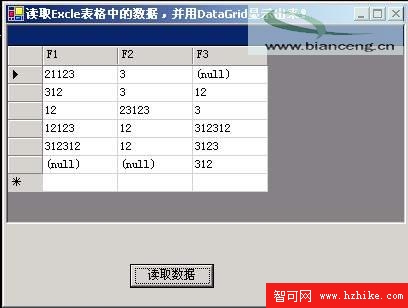
圖01:用 Visual C# 讀取 "c:\sample.xls" 的執行介面
將 SQL 中的 [Sheet1$] 改為 [Sheet2$] 即可讀取 Sheet2,以此類推。