專案架構概覽
- 核心控件:
QTreeWidget(樹形列表,繼承 QTreeView,內建項目模型)
- 資源系統:
.qrc 編譯圖示進二進制,:/prefix/path 存取
- UI 定義:
.ui XML 定義佈局、屬性、初始項目樹
- 信號/槽:
clicked(QModelIndex) 連接自定義槽函數
關鍵 .pro 專案設定
QT       += core gui
TARGET = drawItem
TEMPLATE = app
SOURCES += main.cpp widget.cpp
HEADERS  += widget.h
FORMS    += widget.ui
RESOURCES += icon.qrc
UI 定義精華(widget.ui 關鍵片段)
<widget class="QTreeWidget" name="treeWidget">
  <property name="toolTip">...</property>
  <property name="styleSheet">font: 11pt "Ubuntu"; text-decoration: underline;</property>
  <property name="verticalScrollBarPolicy">Qt::ScrollBarAlwaysOn</property>
  <property name="iconSize"><size><width>50</width><height>50</height></size></property>
  <property name="sortingEnabled">true</property>
  <property name="headerHidden">true</property>
  <column><property name="text">1</property></column>

  <!-- 頂層分組項目 -->
  <item>
    <property name="text">Friends</property>
    <property name="font"><font><weight>75</weight><bold>true</bold></font></property>
    <property name="textAlignment">AlignHCenter|AlignVCenter|AlignCenter</property>
    <property name="background"><brush><color>#0909C1</color></brush></property>
    <property name="foreground"><brush><color>#000000</color></brush></property>

    <!-- 子項目:好友 -->
    <item>
      <property name="text">Friend3<this is comment></property>
      <property name="font"><font><bold>true</bold><underline>true</underline></font></property>
      <property name="icon"><iconset resource="icon.qrc">:/new/prefix1/image/face/101.png</iconset></property>
      <property name="flags">ItemIsSelectable|ItemIsEditable|ItemIsDragEnabled|ItemIsUserCheckable|ItemIsEnabled</property>
      <!-- 子子項目:功能選單 -->
      <item><property name="text">Find</property><property name="icon">:/new/prefix1/image/theme/find.png</property></item>
      <item><property name="text">Email</property><property name="icon">:/new/prefix1/image/theme/chat.png</property></item>
      <item><property name="text">Camera</property><property name="icon">:/new/prefix1/image/theme/qq_album.png</property></item>
    </item>
    <item><property name="text">Friend2</property><property name="icon">:/new/prefix1/image/face/111.png</property></item>
    <item><property name="text">Friend1</property><property name="icon">:/new/prefix1/image/face/126.png</property></item>
  </item>

  <item><property name="text">Devices</property>...</item>
</widget>
核心 C++ 代碼(widget.h/cpp)
// widget.h
#ifndef WIDGET_H
#define WIDGET_H
#include <QWidget>
#include <QModelIndex>

namespace Ui { class Widget; }

class Widget : public QWidget {
    Q_OBJECT
public:
    explicit Widget(QWidget* parent = nullptr);
    ~Widget();
private slots:
    void changeText(const QModelIndex& index);
private:
    Ui::Widget* ui;
};
#endif

// widget.cpp
#include "widget.h"
#include "ui_widget.h"
#include <QtGui>
#include <QtCore>

Widget::Widget(QWidget* parent) : QWidget(parent), ui(new Ui::Widget) {
    ui->setupUi(this);
    connect(ui->treeWidget, SIGNAL(clicked(QModelIndex)),
            this, SLOT(changeText(QModelIndex)));
}

Widget::~Widget() { delete ui; }

void Widget::changeText(const QModelIndex& index) {
    // qDebug() << index.data().toString() << index.column();
    // ui->treeWidget->currentItem()->setText(index.column(),
    //     index.data().toString() + tr("\n(this is write)"));
    // QMessageBox::information(this, tr("title"), index.data().toString(), QMessageBox::Ok);
}
關鍵技術點解析
1. QTreeWidget vs QTreeView
QTreeWidget:便利類,內建 QStandardItemModel,直接操作 QTreeWidgetItem*,適合靜態/半動態資料。QTreeView:純視圖,需自定義 Model(繼承 QAbstractItemModel),適合大量動態資料、多視圖共享模型。
2. 項目屬性全方位自定義
| 屬性 | 設定方式 | 效果 |
|---|
| 圖示 | setIcon() / .ui <property name="icon"> | 節點前顯示圖片 |
| 字型/顏色 | setFont()/setForeground()/setBackground() | 視覺分組、狀態標示 |
| 對齊 | setTextAlignment() | 置中/靠左/靠右 |
| 互動旗標 | setFlags() | 可選/可編輯/可拖曳/可核取方塊 |
| 工具提示 | setToolTip() | 懸停顯示詳細資訊 |
3. 資源系統最佳實踐
icon.qrc 將圖片編譯進執行檔,部署零依賴- 路徑格式:
:/new/prefix1/image/face/101.png(: 開頭)
- 建議目錄結構:
image/face/、image/theme/ 分類管理
4. 信號/槽連接現代寫法(Qt5+)
// 新式語法:編譯期檢查型別安全
connect(ui->treeWidget, &QTreeWidget::clicked,
        this, &Widget::changeText);
運行效果
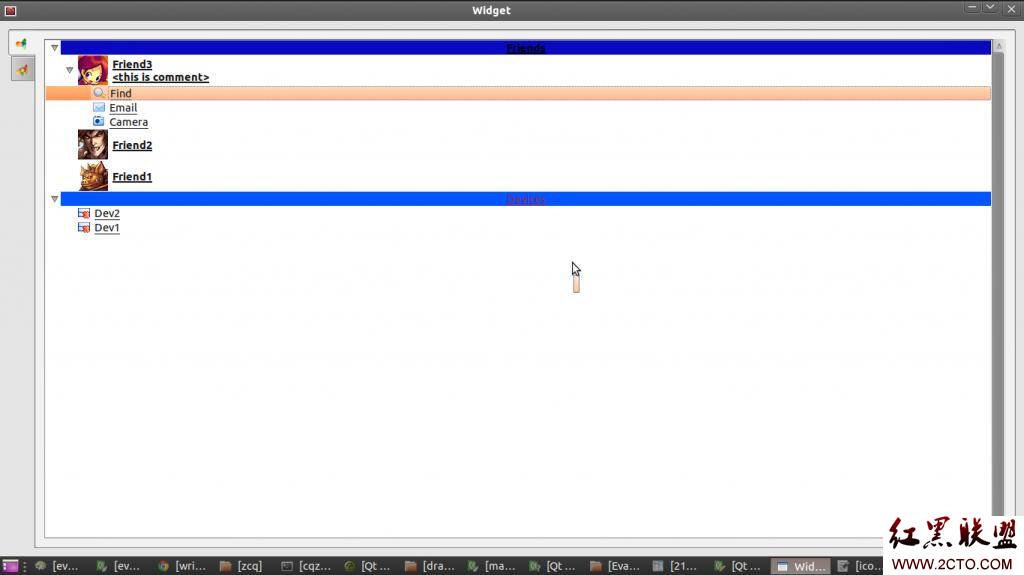
左側標籤頁切換、分組展開/摺疊、好友項目圖示/字型/顏色/底色完整呈現,點擊觸發槽函數可進一步實現聊天視窗跳轉等業務邏輯。
擴展方向
- 動態資料:從資料庫/網路載入,用
addTopLevelItem()、addChild() 動態構建樹
- 右鍵選單:
setContextMenuPolicy(Qt::CustomContextMenu) + customContextMenuRequested 信號
- 拖曳排序:
setDragDropMode(QAbstractItemView::InternalMove)
- 搜尋過濾:
QSortFilterProxyModel 包裝模型實現即時搜尋
- 虛擬化大數據:改用
QTreeView + 自定義 Model 實現按需載入
- 上一篇文章: C++ 保護型解構函數:禁止棧上建構、強制堆分配與工廠模式的經典實現
- 下一篇文章: Qt 系統托盤圖標完整實現:圖標顯示、右鍵選單、氣泡提示、點擊還原與關閉攔截
Copyright ©
程式碼之家 All Rights Reserved