範例刻意簡化以利理解。實務產品可從以下方向強化:
IPlug 介面:增加方法、屬性、事件,強化主程式與外掛互動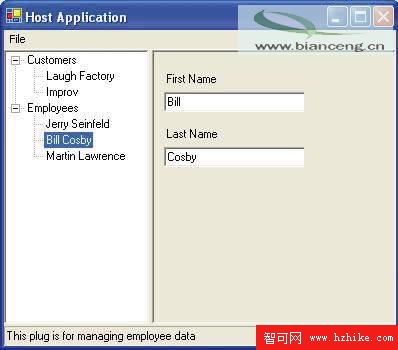
public interface IPlug
{
    IPlugData[] GetData();
    PlugDataEditControl GetEditControl(IPlugData Data);
    bool Save(string Path);
    bool Print(PrintDocument Document);
}[AttributeUsage(AttributeTargets.Class)]
public class PlugDisplayNameAttribute : System.Attribute
{
private string _displayName;
public PlugDisplayNameAttribute(string DisplayName) : base()
{
_displayName = DisplayName;
}
public override string ToString() { return _displayName; }
}[PlugDisplayName("Employees")]
[PlugDescription("This plug is for managing employee data")]
public class EmployeePlug : System.Object, IPlug
{
public IPlugData[] GetData()
{
return new EmployeeData[]
{
new EmployeeData("Jerry", "Seinfeld"),
new EmployeeData("Bill", "Cosby"),
new EmployeeData("Martin", "Lawrence")
};
}
public PlugDataEditControl GetEditControl(IPlugData Data)
{
return new EmployeeControl((EmployeeData)Data);
}
public bool Save(string Path) { /* 實作略 */ }
public bool Print(PrintDocument Document) { /* 實作略 */ }
}private void LoadPlugs()
{
string[] files = Directory.GetFiles("Plugs", "*.plug");
foreach (string f in files)
{
try
{
Assembly a = Assembly.LoadFrom(f);
foreach (Type type in a.GetTypes())
{
if (type.GetInterface("IPlug") != null)
{
if (type.GetCustomAttributes(typeof(PlugDisplayNameAttribute), false).Length != 1)
throw new PlugNotValidException(type, "PlugDisplayNameAttribute is not supported");
if (type.GetCustomAttributes(typeof(PlugDescriptionAttribute), false).Length != 1)
throw new PlugNotValidException(type, "PlugDescriptionAttribute is not supported");
_tree.Nodes.Add(new PlugTreeNode(type));
}
}
}
catch (Exception e) { MessageBox.Show(e.Message); }
}
}