公司需從自有文章平台一鍵發布到 WordPress 站群。初嘗 HttpWebRequest 發現 Cookie 接收不全,導致登錄失敗。改用 Socket 手工構造 HTTP 報文,完全掌控 Cookie 與重定向,並可延伸至秒殺器等場景。
public class HttpSocketClient {
    // 1. GET 請求(攜帶 Cookie)
    public string GetPage(string url, string cookies, string encoding);

    // 2. POST 登錄(自行處理 Cookie)
    public string PostData(string postUrl, string postString, string encoding);

    // 3. 從回應解析 Cookie 與 Location(301/302)
    public string GetCookies(string html, out string location);
}public string GetPage(string url, string cookies, string encoding) {
Uri uri = new Uri(url);
string html = "";
IPAddress ip = Dns.GetHostEntry(uri.Host).AddressList[0];
IPEndPoint ep = new IPEndPoint(ip, 80);
Socket sock = new Socket(AddressFamily.InterNetwork, SocketType.Stream, ProtocolType.Tcp);
try { sock.Connect(ep); } catch { /* 簡易重試邏輯省略 */ }
// 構造 HTTP 頭
string req = "GET " + uri.PathAndQuery + " HTTP/1.1\r\n";
req += "Connection: close\r\n";
req += "Content-Type: application/x-www-form-urlencoded\r\n";
req += "Host: " + uri.Host + "\r\n";
if (!string.IsNullOrEmpty(cookies))
req += "Cookie: " + cookies + "\r\n\r\n";
byte[] data = Encoding.GetEncoding(encoding).GetBytes(req);
sock.Send(data);
// 接收回應
byte[] buf = new byte[1024];
int recv;
do {
recv = sock.Receive(buf);
html += Encoding.GetEncoding(encoding).GetString(buf, 0, recv);
} while (recv != 0);
return html;
}注意: 真實專案需處理 Chunked 編碼、Content-Length、HTTPS (SSL/TLS)、超時重試等,此處為教學簡化版。
public string PostData(string postUrl, string postString, string encoding) {
    Uri uri = new Uri(postUrl);
    string req = string.Format(
        "POST {0} HTTP/1.1\r\n" +
        "Host: {1}\r\n" +
        "User-Agent: Mozilla/5.0 (Windows NT 6.1; rv:5.0) Gecko/20100101 Firefox/5.0\r\n" +
        "Content-Type: application/x-www-form-urlencoded\r\n" +
        "Content-Length: {2}\r\n" +
        "Connection: close\r\n\r\n" +
        "{3}\r\n",
        uri.PathAndQuery, uri.Host, postString.Length, postString);

    byte[] bytes = Encoding.GetEncoding(encoding).GetBytes(req);
    IPAddress ip = Dns.GetHostEntry(uri.Host).AddressList[0];
    IPEndPoint ep = new IPEndPoint(ip, 80);
    Socket s = new Socket(AddressFamily.InterNetwork, SocketType.Stream, ProtocolType.Tcp);
    s.Connect(ep);
    if (!s.Connected) return "連接失敗";

    s.Send(bytes, bytes.Length, SocketFlags.None);
    return Recv(s, Encoding.GetEncoding(encoding)); // Recv 同 GetPage 接收邏輯
}public string GetCookies(string html, out string location) {
StringBuilder sb = new StringBuilder();
location = "";
string[] lines = html.Split(new[] { "\r\n" }, StringSplitOptions.RemoveEmptyEntries);
foreach (string line in lines) {
if (line.StartsWith("Set-Cookie: ")) {
int semi = line.IndexOf(';');
string cookie = line.Substring(12, semi - 11); // 取 name=value
sb.Append(cookie).Append("; ");
}
else if (line.StartsWith("Location:")) {
location = line.Substring(10).Trim();
}
}
return sb.ToString().TrimEnd(';', ' ');
}登錄流程:POST /wp-login.php → 解析 Set-Cookie → 若有 Location 則 GET 重定向 → 後續請求攜帶 Cookie。
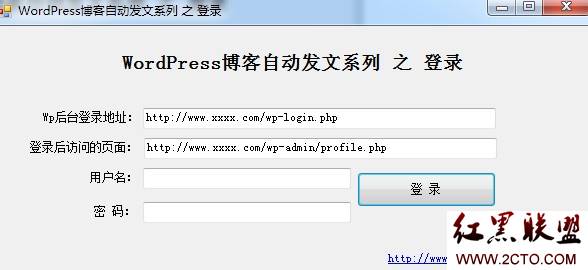
CookieContainer 自動管理。SslStream 包裝 Socket,或直接改用 HttpClient (現代 .NET 首選)。charset,否則中文亂碼。_wpnonce 隱藏欄位,攜帶在 POST 中。同樣原理,只需:
提醒: 任何自動化腳本請遵守目標站點 robots.txt 及法律法規,切勿濫用。
歡迎大俠們拋磚引玉,共同精進!