| 特性 | GDI | GDI+ |
|---|
| 程式介面 | C 風格 API + Handle | C++ 類別庫,物件導向 |
| 裝置內容 (DC) | 手動 Get/Release/SelectObject | Graphics 物件封裝,無需選入/選出 |
| 圖片格式 | 僅 BMP,其餘需自行解碼 | 內建 BMP/GIF/JPEG/PNG/TIFF/WMF/EMF/ICON |
| 漸層/透明 | 極度繁瑣 | 原生支援 LinearGradientBrush、Alpha 混色 |
| 座標系統 | 裝置座標為主 | 支援世界/頁面/裝置座標轉換 |
GDI+ 僅支援 Windows XP/Server 2003 以上,現代 Windows 皆內建。
專案設定
// stdafx.h 或共用頭檔
#include <gdiplus.h>
using namespace Gdiplus;
#pragma comment(lib, "Gdiplus.lib")
應用程式啟動/結束時呼叫:
ULONG_PTR gdiplusToken;
GdiplusStartupInput gdiplusStartupInput;
GdiplusStartup(&gdiplusToken, &gdiplusStartupInput, NULL);  // 初始化
// ... 程式主迴圈 ...
GdiplusShutdown(gdiplusToken);  // 關閉
MFC 專案可在 CWinApp::InitInstance / ExitInstance 中配對呼叫。
核心類別速查
Graphics:繪圖表面,對應 HDC,所有繪圖方法皆屬於此類Pen:畫筆,線條顏色/寬度/樣式Brush / SolidBrush / LinearGradientBrush:填滿樣式Font / FontFamily / StringFormat:文字繪製Image / Bitmap:圖片載入與繪製Color:ARGB 32-bit 顏色Rect / Point / PointF:幾何結構
基礎範例:畫線與文字
VOID OnPaint(HDC hdc) {
    Graphics g(hdc);
    Pen pen(Color(255, 0, 0, 255));  // ARGB: 不透明藍
    g.DrawLine(&pen, 0, 0, 200, 100);
}
VOID OnPaint(HDC hdc) {
    Graphics g(hdc);
    SolidBrush brush(Color(255, 0, 0, 255));
    FontFamily ff(L"Times New Roman");
    Font font(&ff, 24, FontStyleRegular, UnitPixel);
    PointF pt(10, 20);
    g.DrawString(L"Hello World!", -1, &font, pt, &brush);
}
圖片載入與繪製
void OnButtonClick() {
    HDC hdc = GetDC()->m_hDC;
    Graphics g(hdc);
    Image img(L"c:\\image\\photo.jpg");  // 僅支援檔案路徑或 Stream
    g.DrawImage(&img, 200, 200);       // 左上角座標
}
注意:Image 不支援資源 ID 直接載入,需先讀入 IStream。
漸層筆刷實戰
void OnPaintGradient(HDC hdc) {
    Graphics g(hdc);
    // 水平漸層:從 (0,10) 到 (200,10),紅→藍
    LinearGradientBrush lgb(Point(0, 10), Point(200, 10),
                            Color(255, 255, 0, 0), Color(255, 0, 0, 255));
    Pen pen(&lgb, 4);  // 畫筆使用漸層筆刷
    g.DrawLine(&pen, 100, 100, 200, 100);
    g.FillEllipse(&lgb, 100, 150, 200, 100);
    g.FillRectangle(&lgb, 100, 255, 500, 30);
}
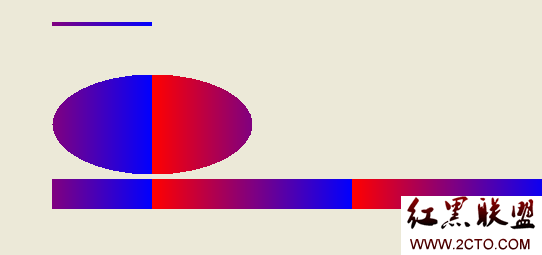
三種線性漸層:水平、對角線、自訂角度(透過兩點座標決定)。另支援 PathGradientBrush 做放射狀漸層。
GDI/GDI+ 混合繪圖
利用 Graphics::GetHDC() / ReleaseHDC() 取得/歸還 HDC:
VOID MixedDraw(Graphics* g) {
    Pen pen(Color(255, 0, 0, 255));
    g->DrawEllipse(&pen, 10, 10, 100, 50);  // GDI+
    HDC hdc = g->GetHDC();
    Rectangle(hdc, 120, 10, 220, 60);        // GDI
    g->ReleaseHDC(hdc);
    g->DrawLine(&pen, 240, 10, 340, 60);     // GDI+ 繼續
}
警告:在 GetHDC / ReleaseHDC 之間不可呼叫任何 GDI+ 方法,否則行為未定義。
- 上一篇文章: 螞蟻在木桿上:經典算法問題的巧妙解法
- 下一篇文章: 使用 libgtop 库轻松监控 Linux 系统 CPU 与内存使用率
Copyright ©
程式碼之家 All Rights Reserved