動態鏈接庫包含可被多個程式同時使用的代碼與數據,促進代碼復用、減少內存佔用、簡化部署。Windows 系統大量使用 DLL(如 Comdlg32.dll 提供通用對話框)。
| 白盒復用(源碼) | 黑盒復用(DLL) |
|---|---|
| 源碼暴露 | 隱藏實現細節 |
| 多份拷貝浪費存儲 | 單一文件共享 |
| 易發生命名衝突 | 獨立命名空間 |
| 更新困難 | 替換 DLL 即可升級 |
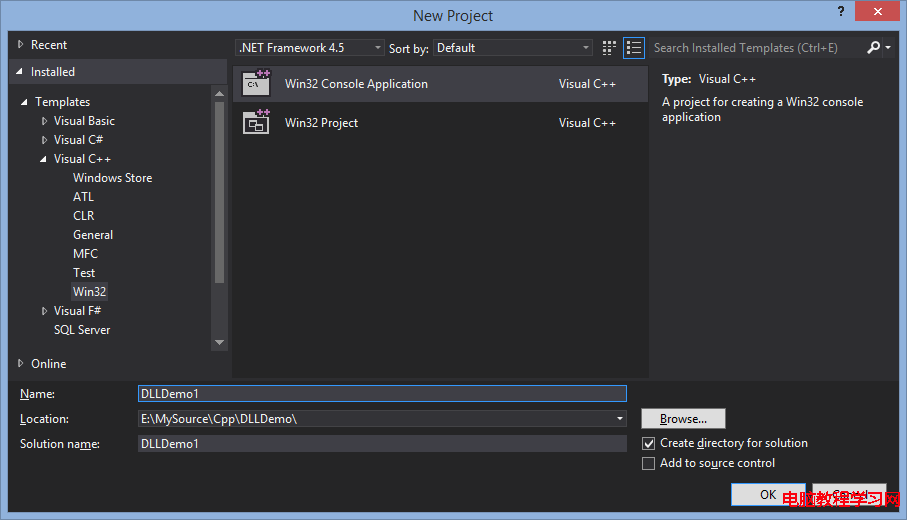
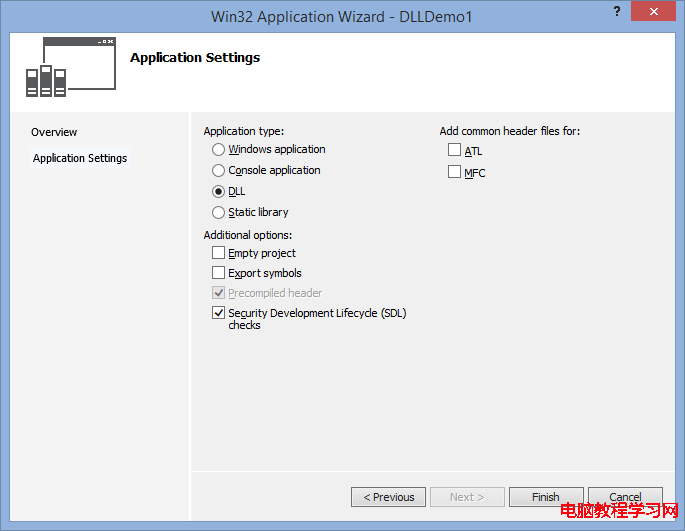
VS 2012 → File → New → Project → Visual C++ → Win32 Project,名稱 DLLDemo1,應用程式類型選 DLL,勾選 Export symbols。
MyCode.h
#ifndef _MYCODE_H_
#define _MYCODE_H_

#ifdef DLLDemo1_EXPORTS
#define EXPORTS_DEMO __declspec(dllexport)
#else
#define EXPORTS_DEMO __declspec(dllimport)
#endif

extern "C" EXPORTS_DEMO int Add(int a, int b);

#endif
MyCode.cpp
#include "stdafx.h"
#include "MyCode.h"

int Add(int a, int b) {
    return a + b;
}
Build 專案,輸出目錄下得到 DLLDemo1.dll、DLLDemo1.lib、DLLDemo1.h。
編譯期鏈接 .lib,運行期自動加載 DLL,調用如同本地函數。
#include <windows.h>
#include <iostream>
#include "MyCode.h"
#pragma comment(lib, "..\\Debug\\DLLDemo1.lib")

using namespace std;

int main() {
    cout << Add(2, 3) << endl;  // 直接調用
    return 0;
}
使用 LoadLibrary / GetProcAddress / FreeLibrary,無需 .lib,靈活控制加載時機。
#include <windows.h>
#include <iostream>
using namespace std;

typedef int (*AddFunc)(int, int);

int main() {
    HMODULE hDll = LoadLibrary("DLLDemo1.dll");
    if (hDll) {
        AddFunc add = (AddFunc)GetProcAddress(hDll, "Add");
        if (add) {
            cout << add(2, 3) << endl;
        }
        FreeLibrary(hDll);
    }
    return 0;
}
| 場景 | 推薦方式 |
|---|---|
| 啟動性能敏感 | 運行時動態鏈接(延遲加載) |
| 調用簡便、固定依賴 | 加載時動態鏈接 |
| 需根據條件加載不同版本 | 運行時動態鏈接 |
無需 __declspec(dllexport),通過模塊定義文件導出:
; MyCode.def
LIBRARY "DLLDemo2"
EXPORTS
    Add @1
調用時使用序號:
AddFunc add = (AddFunc)GetProcAddress(hDll, MAKEINTRESOURCE(1));
BOOL APIENTRY DllMain(HMODULE hModule, DWORD ul_reason, LPVOID lpReserved) {
    switch (ul_reason) {
        case DLL_PROCESS_ATTACH:  // 進程加載 DLL
            // 初始化,禁用線程通知優化
            DisableThreadLibraryCalls(hModule);
            break;
        case DLL_THREAD_ATTACH:   // 線程創建(若未禁用)
            break;
        case DLL_THREAD_DETACH:   // 線程結束
            break;
        case DLL_PROCESS_DETACH:  // 進程卸載 DLL
            // 清理資源
            break;
    }
    return TRUE;
}
DLL_PROCESS_DETACH 不會在 TerminateProcess 時調用,可能導致資源洩漏掌握 DLL 創建、兩種調用方式、.def 導出、DllMain 生命周期,即可在 C++ 專案中靈活實現模塊化、插件化架構。現代開發中更推薦使用 CMake 管理跨平台 DLL 構建,並配合版本資源、數字簽名進行發布。