Access 為檔案型資料庫,不支援多使用者並發遠端連線。利用 .NET Remoting 將連線與存取邏輯封裝為伺服器端物件,客戶端透過 Proxy 呼叫,實現分散式存取。
MarshalByRefObject,含實際 Access 連線/查詢/更新方法。DataTable 綁定 DataGridView、更新資料。
public class CRemoteAccess : MarshalByRefObject
{
    public static string ConnString; // 靜態保存連線字串

    public void SetConnectionString(string connStr) => ConnString = connStr;

    private OleDbConnection _conn;
    private OleDbDataAdapter _adapter;
    private DataSet _ds = new DataSet();

    private void LoadData(string sql, string tableName)
    {
        _conn = new OleDbConnection(ConnString);
        _adapter = new OleDbDataAdapter(sql, _conn);
        _ds.Tables.Clear();
        _adapter.Fill(_ds, tableName);
    }

    public DataTable GetTable(string sql, string tableName)
    {
        LoadData(sql, tableName);
        return _ds.Tables[tableName];
    }

    public void SaveData(DataTable dt)
    {
        _conn.Open();
        _adapter.Update(dt); // 批次更新
        _conn.Close();
    }
}
RemotableObject = new RemoteObject.CRemoteAccess();
TcpChannel channel = new TcpChannel(8080);
ChannelServices.RegisterChannel(channel);
RemotingConfiguration.RegisterWellKnownServiceType(
    typeof(RemoteObject.CRemoteAccess),
    "RithiaTestAccessServer",
    WellKnownObjectMode.Singleton);
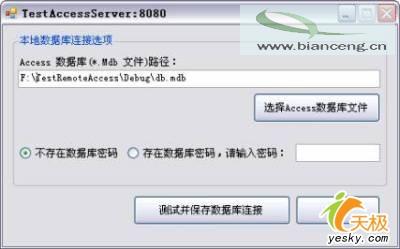
選擇檔案後:
RemotableObject.SetConnectionString(providerStr);
string url = $"tcp://{host}:{port}/RithiaTestAccessServer";
TcpChannel chan = new TcpChannel();
ChannelServices.RegisterChannel(chan);
_remoteObj = (RemoteObject.CRemoteAccess)Activator.GetObject(
    typeof(RemoteObject.CRemoteAccess), url);
_remoteTable = new DataTable();
_remoteTable = _remoteObj.GetTable(sql, "Test"); dataGridView1.DataSource = _remoteTable;_remoteObj.SaveData(_remoteTable);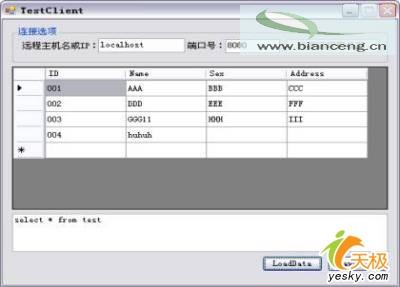
MarshalByRefObject:透過 Proxy 交換訊息,物件留在伺服器端。WellKnownObjectMode.Singleton:所有客戶端共用同一個遠端物件實例,適合共享連線。DataTable 序列化傳輸:ADO.NET DataTable 原生支援遠端傳遞。.NET Remoting 屬舊技術 (.NET Framework 專屬),新專案建議採用: