在 C# 中,自動實作屬性(Auto-Implemented Properties)讓程式碼更簡潔,但當搭配反射機制使用時,可能會產生令人驚訝的結果。本文透過一個具體範例,示範當基類使用自動實作屬性時,透過反射取得衍生類別的欄位資訊時,會遺漏基類自動屬性對應的後端欄位。
以下定義了三個類別:Person(基類)、Employee(衍生類別)以及 Program(測試程式)。
using System;

namespace CompilerGeneratedProps
{
    public class Person
    {
        // 傳統屬性:有明確的後端欄位
        protected string _LastName; // 宣告為 protected 以利擴充

        public string FirstName { get; set; } // 自動實作屬性

        public string LastName
        {
            get { return this._LastName; }
            set { this._LastName = value; }
        }
    }
}
using System;

namespace CompilerGeneratedProps
{
    public class Employee : Person
    {
        // 欄位
        protected string Title;
    }
}
using System;
using System.Reflection;

namespace CompilerGeneratedProps
{
    public class Program
    {
        static void Main(string[] args)
        {
            Console.WriteLine("Fields seen in an instance of Person");
            Console.WriteLine("-------------------------------------------------------");
            Person objPerson = new Person();
            foreach (FieldInfo fi in objPerson.GetType().GetFields(
                BindingFlags.Instance | BindingFlags.NonPublic | BindingFlags.Public))
            {
                Console.WriteLine(fi.Name);
            }

            Console.WriteLine("\n\n\n\nFields seen in an instance of Employee");
            Console.WriteLine("-------------------------------------------------------");
            Employee objEmployee = new Employee();
            foreach (FieldInfo fi in objEmployee.GetType().GetFields(
                BindingFlags.Instance | BindingFlags.NonPublic | BindingFlags.Public))
            {
                Console.WriteLine(fi.Name);
            }
            Console.Read();
        }
    }
}
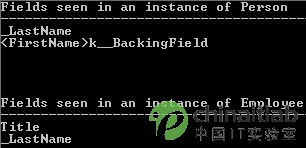
從輸出結果可以觀察到:
_LastName 與 <FirstName>k__BackingField 兩個欄位。自動實作屬性 FirstName 編譯器會自動產生一個名為 <FirstName>k__BackingField 的後端欄位。Title 與 _LastName,缺少 基類自動實作屬性 FirstName 對應的後端欄位。當使用 GetFields 並指定 BindingFlags.DeclaredOnly(預設不包含繼承的欄位)時,反射只會回傳該類別直接宣告的欄位。基類的自動實作屬性產生的後端欄位屬於基類宣告,不會出現在衍生類別的欄位列表中。若需取得繼承鏈上的所有欄位,必須遞迴遍歷基類,或使用 GetFields() 不指定 DeclaredOnly(但預設行為已包含繼承的 public/protected 欄位,實測仍遺漏私有後端欄位)。
LastName 範例),確保欄位可被反射發現。BaseType,收集各層級的欄位。GetProperties 取得屬性資訊,再透過 GetValue/SetValue 操作,不需關心後端欄位。自動實作屬性雖方便,但在涉及反射、序列化、OR Mapping 等依賴後端欄位的場景時,需謹慎評估。理解編譯器自動產生欄位的命名規則(<PropertyName>k__BackingField)與繼承關係下的反射行為,有助於避開這類「意想不到的行為」。