陣列作為 System.Array 的實例,擁有豐富的屬性與實例方法。本文系統整理一維與多維陣列的屬性查詢、常用實例方法(複製、反轉、搜尋、複製、克隆),並示範邊界檢查與異常處理。
int[] arr = new int[5];
for (int i = 1; i <= 5; i++) arr[i-1] = i;

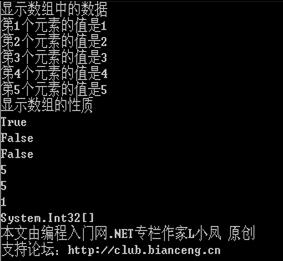
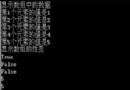
Console.WriteLine("IsFixedSize: " + arr.IsFixedSize);     // True
Console.WriteLine("IsReadOnly: " + arr.IsReadOnly);       // False
Console.WriteLine("IsSynchronized: " + arr.IsSynchronized); // False
Console.WriteLine("Length: " + arr.Length);               // 5
Console.WriteLine("LongLength: " + arr.LongLength);       // 5 (long 版本)
Console.WriteLine("Rank: " + arr.Rank);                   // 1 (維度)
Console.WriteLine("SyncRoot: " + arr.SyncRoot); // 同步鎖物件多維陣列同樣擁有此屬性,Rank 反映維度數,Length 為總元素數。
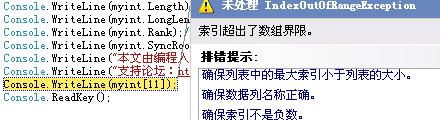
// 索引從 0 開始,合法範圍 [0, Length-1]
// arr[5] = 99; // 拋出 IndexOutOfRangeException
圖示異常截圖:存取超出邊界索引時運行時拋出異常,需透過邊界檢查或 try-catch 處理。
int[] src = { 1, 2, 1, 3 };
Console.WriteLine("IndexOf 1: " + Array.IndexOf(src, 1));       // 0
Console.WriteLine("LastIndexOf 1: " + Array.LastIndexOf(src, 1)); // 2

Array.Reverse(src); // 就地反轉
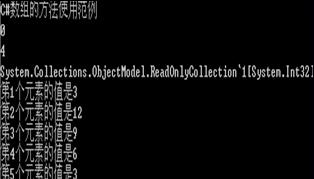
// src 變為 {3, 1, 2, 1}var readOnly = Array.AsReadOnly(src); // 回傳 ReadOnlyCollection包裝
int[] dest = new int[src.Length];
src.CopyTo(dest, 0); // 複製到目標陣列索引 0
// dest = {3, 1, 2, 1}Console.WriteLine("GetLength(0): " + src.GetLength(0)); // 4
Console.WriteLine("GetLongLength(0): " + src.GetLongLength(0)); // 4
Console.WriteLine("GetLowerBound(0): " + src.GetLowerBound(0)); // 0
Console.WriteLine("GetUpperBound(0): " + src.GetUpperBound(0)); // 3多維陣列傳入維度索引(0-based)查詢對應維度資訊。
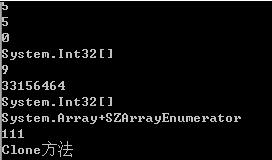
Console.WriteLine("GetValue(2): " + src.GetValue(2)); // 2
Console.WriteLine("GetHashCode: " + src.GetHashCode());
Console.WriteLine("ToString: " + src.ToString()); // System.Int32[]IEnumerator e = src.GetEnumerator();
while (e.MoveNext()) Console.Write(e.Current + " ");
src.SetValue(111, 0); // src[0] = 111
Console.WriteLine("\nSetValue後 src[0]: " + src[0]);int[] orig = { 1, 2, 3 };
int[] clone = (int[])orig.Clone(); // 新陣列,元素為值型別故獨立
clone[0] = 10; clone[1] = 20; clone[2] = 30;
Console.WriteLine("原陣列: " + string.Join(",", orig)); // 1,2,3
Console.WriteLine("克隆陣列: " + string.Join(",", clone)); // 10,20,30值型別元素克隆後獨立;參考型別元素則共享引用(淺層複製)。
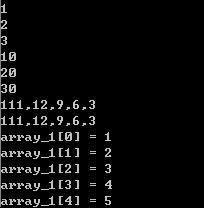
int[] copyArr = new int[arr.Length];
arr.CopyTo(copyArr, 0); // 複製全部
// copyArr = {1,2,3,4,5}int[] arr2 = new int[5];
for (int i = arr2.GetLowerBound(0); i <= arr2.GetUpperBound(0); i++)
arr2[i] = i + 1; // 安全遍歷,適用多維陣列二維陣列 int[,] m = new int[3,4]:
Rank = 2GetLength(0)=3, GetLength(1)=4GetLowerBound(0)=0, GetUpperBound(0)=2GetValue(i,j) / SetValue(val,i,j) 存取陣列實例方法提供了比靜態 Array.xxx 更物件導向的操作風格。掌握 CopyTo、Clone、Reverse、GetLowerBound/GetUpperBound 等方法,能編寫更安全、通用的陣列處理代碼。