前幾章節的物件頭像面板、迷你雷達地圖等視窗位置固定,處理方式簡單。但在 RPG、SLG、養成類遊戲中,大量使用可自由拖曳的懸浮視窗:背包、裝備、屬性、技能、系統設定等。這要求我們打造一個通用、易用、高自由度的 ChildWindow 控件。本節將實作包含可拖曳標題列、關閉按鈕、內容主體三大部件的自訂 ChildWindow,並用它實作迷你尋路地圖。
Control 或 ContentControl,程式碼佈局與事件處理。傳統但 WPF/Silverlight 中易用性差,因 XAML 介入,且需深厚底層控件開發經驗。Generic.xaml 定義樣板。國外開發者常用,但中文支援不佳、OnApplyTemplate 重載不靈活,擴充與開發難度非最理想。UserControl,結構簡單卻蘊含高度靈活性。本節採用此法。XAML 結構極簡:
<UserControl x:Class="QXGameEngine.Control.QXChildWindow"
  xmlns="https://schemas.microsoft.com/winfx/2006/xaml/presentation"
  xmlns:x="https://schemas.microsoft.com/winfx/2006/xaml"
  MouseLeftButtonDown="UserControl_MouseLeftButtonDown">
  <Canvas>
    <Canvas x:Name="Head" MouseLeftButtonUp="Head_MouseLeftButtonUp" MouseMove="Head_MouseMove">
      <ContentPresenter x:Name="HeadPresenter" />
      <Rectangle x:Name="CloseButton">
        <ToolTipService.ToolTip>
          <TextBlock x:Name="Tip" Text="關閉" />
        </ToolTipService.ToolTip>
      </Rectangle>
    </Canvas>
    <Canvas x:Name="Body">
      <ContentPresenter x:Name="BodyPresenter" />
    </Canvas>
  </Canvas>
</UserControl>
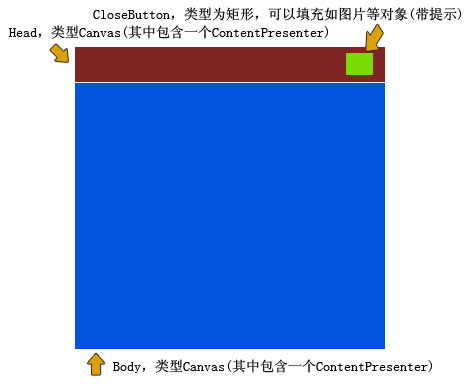
結構示意圖:
靈活性解析:
Head 為 Canvas,背景可設為任意 Brush(漸層、圖片、影片)。內含 HeadPresenter (ContentPresenter),後台可指派任意物件(矩形、圖片、畫布、甚至另一個 QXChildWindow),佈局完全自由。Body 同理,透過 BodyPresenter 實現內容任意置換。定義 CLR 屬性賦值,並透過路由事件 MouseLeftButtonDown、MouseLeftButtonUp、MouseMove 實現拖曳、關閉、層級管理等功能。
註冊鍵盤事件(Ctrl+Tab)顯示視窗:
private void UserControl_KeyDown(object sender, KeyEventArgs e) {
    if (e.Key == Key.Tab && (Keyboard.Modifiers & ModifierKeys.Control) == ModifierKeys.Control) {
        // 顯示尋路地圖邏輯
    }
}
建立 QXChildWindow 實例並設定參數:
wayfindingWindow = new QXChildWindow() {
    Left = 105, Top = 40,
    HeadLeft = 0, HeadTop = 0, HeadWidth = 604, HeadHeight = 37,
    HeadBackground = new ImageBrush() { ImageSource = Super.GetImage("/Image/Plate/WayfindingMapHead.png") },
    BodyLeft = 0, BodyTop = 37, BodyWidth = 604, BodyHeight = 479,
    BodyBackground = new ImageBrush() { ImageSource = Super.GetImage("/Image/Plate/WayfindingMapBody.png") },
    CloseButtonLeft = 582, CloseButtonTop = 0, CloseButtonWidth = 22, CloseButtonHeight = 22,
    CloseButtonFill = new ImageBrush() { ImageSource = Super.GetImage("/Image/Icon/11.png") }
};
Root.Children.Add(wayfindingWindow);
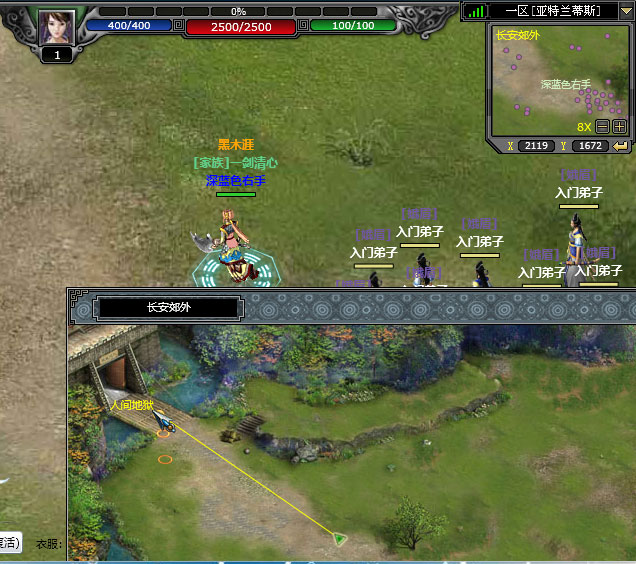
面板內的地圖名稱、地圖畫布等可透過 HeadPresenter、BodyPresenter 輕鬆注入。主角位置每 500ms 於背景執行緒更新(僅顯示時才運算),節省效能。主角圖示為朝北三角形,依 Angle = Leader.Direction * 45 旋轉;另加一條釣魚線連接主角與點擊目標點,模仿《劍俠世界》設計,便於把握距離。
已知問題:Silverlight 渲染機制導致 MouseMove 拖曳效能非最佳;且 MouseMove、MouseDown、MouseUp 雖為路由事件,卻無法 e.Handled,造成命中測試穿透 ChildWindow 層。期待未來版本改善。
原始碼下載:目錄中;線上演示:https://silverfuture.cn