Head First Design Patterns 以策略模式作為首個範例,陳俊杉教授授課也以此為起點,可見策略模式極適合初學者入門。
定義一族演算法,將各演算法封裝並可互換使用,且不影響外界使用者。
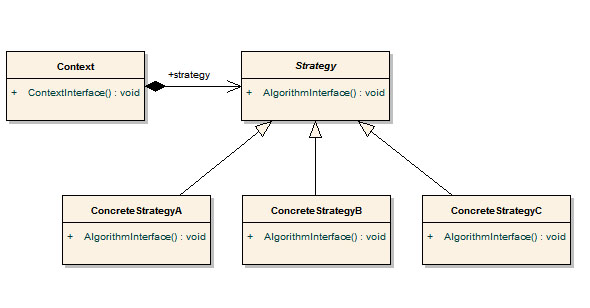
GoF 稱策略模式亦為 Policy,作者偏好稱之為 Plugin,因可動態替換演算法,如同 Eclipse 插件系統。
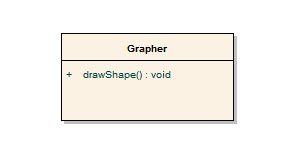
原本 Grapher 只能畫正方形。
需求變更:需支援三角形、圓形,未來可能擴充橢圓、菱形等。若在 Grapher 持續新增 drawTriangle()、drawCircle() 等方法,違反開放封閉原則 (OCP)。依 DP 第三守則:「識別會變的部分並將其從不變的部分分離」,將變動的繪圖行為封裝為類別,並定義介面 IShape 作為溝通標準。
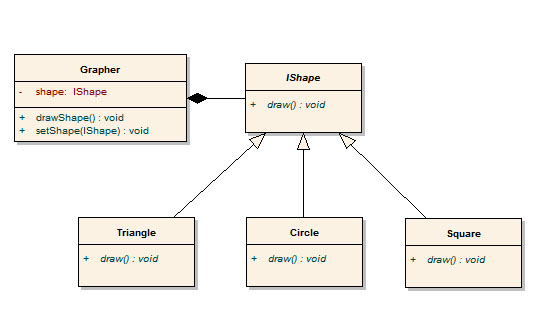
此架構符合 OCP:新增形狀無需修改既有程式碼,僅需實作 IShape。.NET Framework 與 STL 大量採用策略模式。
策略模式就是將會變動的成員函數用類別封裝,變成物件「掛」在原本類別上。
/**/*
 (C) OOMusou 2007 https://oomusou.cnblogs.com

Filename : DP_StrategyPattern_Classic.cpp
Compiler : Visual C++ 8.0 / BCB 6.0 / gcc 3.4.2 / ISO C++
Description : Demo how to use Strategy Pattern
Release : 03/26/2007 1.0 / 07/10/2007 2.0
*/
#include <iostream>
using namespace std;

class IDrawStrategy {
public:
 virtual void draw() const = 0;
};

class Grapher {
public:
 Grapher(IDrawStrategy* drawStrategy = 0) : _drawStrategy(drawStrategy) {}

public:
 void drawShape() const;
 void setShape(IDrawStrategy* drawStrategy);

protected:
 IDrawStrategy* _drawStrategy;
};

void Grapher::drawShape() const {
 if (_drawStrategy) _drawStrategy->draw();
}

void Grapher::setShape(IDrawStrategy* drawStrategy) {
 _drawStrategy = drawStrategy;
}

class Triangle : public IDrawStrategy {
public: void draw() const;
};
void Triangle::draw() const { cout << "Draw Triangle" << endl; }

class Circle : public IDrawStrategy {
public: void draw() const;
};
void Circle::draw() const { cout << "Draw Circle" << endl; }

class Square : public IDrawStrategy {
public: void draw() const;
};
void Square::draw() const { cout << "Draw Square" << endl; }

int main() {
 Grapher grapher(&Square());
 grapher.drawShape();
 grapher.setShape(&Circle());
 grapher.drawShape();
}執行結果:Draw Square / Draw Circle
第 67、70 行展現策略模式之美:動態替換演算法如同 Plugin,擴充新形狀只需新增實作 IDrawStrategy 的類別,符合 OCP。
/**/*
 (C) OOMusou 2007 https://oomusou.cnblogs.com

Filename : DP_StrategyPattern_Classic.cs
Compiler : Visual Studio 2005 / C# 2.0
Description : Demo how to implement Strategy Pattern by C#
Release : 07/08/2007 1.0
*/
using System;

interface IDrawStrategy { void draw(); }

class Grapher {
 private IDrawStrategy _drawStrategy = null;
 public Grapher() {}
 public Grapher(IDrawStrategy drawStrategy) { _drawStrategy = drawStrategy; }
 public void drawShape() { if (_drawStrategy != null) _drawStrategy.draw(); }
 public void setShape(IDrawStrategy drawStrategy) { _drawStrategy = drawStrategy; }
}

class Triangle : IDrawStrategy { public void draw() { Console.WriteLine("Draw Triangle"); } }
class Circle : IDrawStrategy { public void draw() { Console.WriteLine("Draw Circle"); } }
class Square : IDrawStrategy { public void draw() { Console.WriteLine("Draw Square"); } }

class Program {
 public static void Main() {
 Grapher grapher = new Grapher(new Square());
 grapher.drawShape();
 grapher.setShape(new Circle());
 grapher.drawShape();
 }
}執行結果:Draw Square / Draw Circle
Effective C++ Item 35 亦使用函數指標實作策略模式,為 C/C++ 獨有寫法。
/**/*
 (C) OOMusou 2007 https://oomusou.cnblogs.com

Filename : DP_StrategyPattern_FunctionPointer.cpp
Compiler : Visual C++ 8.0 / BCB 6.0 / gcc 3.4.2 / ISO C++
Description : Demo how to use Strategy Pattern by function pointer
Release : 03/31/2007 1.0 / 07/08/2007 2.0 / 07/10/2007 3.0
*/
#include <iostream>
using namespace std;

class Grapher {
public:
 typedef void (*pfDraw)();
 Grapher(pfDraw draw = 0) : _draw(draw) {}

public:
 void drawShape() const;
 void setShape(pfDraw draw);

protected:
 pfDraw _draw;
};

void Grapher::drawShape() const { if (_draw) _draw(); }
void Grapher::setShape(pfDraw draw) { _draw = draw; }

class Triangle { public: static void draw(); };
void Triangle::draw() { cout << "Draw Triangle" << endl; }
class Circle { public: static void draw(); };
void Circle::draw() { cout << "Draw Circle" << endl; }
class Square { public: static void draw(); };
void Square::draw() { cout << "Draw Square" << endl; }

int main() {
 Grapher grapher(Square::draw);
 grapher.drawShape();
 grapher.setShape(Circle::draw);
 grapher.drawShape();
}
本質上將介面定義函數簽名,改由 typedef void (*pfDraw)() 定義函數指標型別。
委派是 C# 對函數指標與觀察者模式的實作,理應可用於策略模式。
/**/*
 (C) OOMusou 2007 https://oomusou.cnblogs.com

Filename : DP_StrategyPattern_Delegate.cs
Compiler : Visual Studio 2005 / C# 2.0
Description : Demo how to implement Strategy Pattern by C# delegate
Release : 07/08/2007 1.0
*/
using System;

class Grapher {
 private DrawDelegate _drawDelegate = null;
 public delegate void DrawDelegate();
 public Grapher() {}
 public Grapher(DrawDelegate drawDelegate) { _drawDelegate = drawDelegate; }
 public void drawShape() { if (_drawDelegate != null) _drawDelegate(); }
 public void setShape(DrawDelegate drawDelegate) { _drawDelegate = drawDelegate; }
}

class Triangle { public static void draw() { Console.WriteLine("Draw Triangle"); } }
class Circle { public static void draw() { Console.WriteLine("Draw Circle"); } }
class Square { public static void draw() { Console.WriteLine("Draw Square"); } }

class Program {
 public static void Main() {
 Grapher grapher = new Grapher(Square.draw);
 grapher.drawShape();
 grapher.setShape(Circle.draw);
 grapher.drawShape();
 }
}執行結果:Draw Square / Draw Circle
GoF 《Design Patterns》亦展示 Template 實作策略模式。
/**/*
 (C) OOMusou 2007 https://oomusou.cnblogs.com

Filename : DP_StrategyPattern_template.cpp
Compiler : Visual C++ 8.0 / BCB 6.0 / gcc 3.4.2 / ISO C++
Description : Demo how to use Strategy Pattern by template
Release : 03/31/2007 1.0
*/
#include <iostream>
using namespace std;

template <typename T>
class Grapher {
private: T _drawTemplate;
public: void drawShape() const;
};

template<typename T>
void Grapher<T>::drawShape() const { _drawTemplate.draw(); }

class Triangle { public: void draw() const; };
void Triangle::draw() const { cout << "Draw Triangle" << endl; }
class Circle { public: void draw() const; };
void Circle::draw() const { cout << "Draw Circle" << endl; }
class Square { public: void draw() const; };
void Square::draw() const { cout << "Draw Square" << endl; }

int main() {
 Grapher<Square> grapher; grapher.drawShape();
 Grapher<Circle> grapher2; grapher2.drawShape();
}執行結果:Draw Square / Draw Circle
差異:OOP 介面 + 動態繫結屬執行期完成,優點可動態改變,缺點速度較慢;GP Template 屬編譯期完成,優點速度快,缺點無法執行期動態改變,故無 setShape(),策略需在實例化時指定。
C# 2.0 提供泛型,同樣可實作策略模式。
/**/*
 (C) OOMusou 2007 https://oomusou.cnblogs.com

Filename : DP_StrategyPattern_Generics.cs
Compiler : Visual Studio 2005 / C# 2.0
Description : Demo how to implement Strategy Pattern by C# Generics
Release : 07/08/2007 1.0
*/
using System;

interface IDrawStrategy { void draw(); }

class Grapher<T> where T : class, IDrawStrategy, new() {
 private T _drawStrategy = default(T);
 public Grapher() { _drawStrategy = new T(); }
 public void drawShape() { if (_drawStrategy != null) _drawStrategy.draw(); }
 public void setShape(T drawStrategy) { _drawStrategy = drawStrategy; }
}

class Triangle : IDrawStrategy { public void draw() { Console.WriteLine("Draw Triangle"); } }
class Circle : IDrawStrategy { public void draw() { Console.WriteLine("Draw Circle"); } }
class Square : IDrawStrategy { public void draw() { Console.WriteLine("Draw Square"); } }

class Program {
 public static void Main() {
 Grapher<Square> grapher = new Grapher<Square>(); grapher.drawShape();
 Grapher<Circle> grapher2 = new Grapher<Circle>(); grapher2.drawShape();
 }
}執行結果:Draw Square / Draw Circle
兩者目的相同,手法不同:策略用物件委派(執行期可變),模板方法用類別繼承(編譯期決定)。
GoF 原文:Template methods use inheritance to vary part of an algorithm. Strategies use delegation to vary the entire algorithm.