在命令提示字元(需管理員權限)執行:
net start mssqlservernet stop mssqlserver服務名稱 mssqlserver 為預設實例;命名實例需改為 MSSQL$實例名。
引用 System.ServiceProcess,使用 ServiceController 類別。
using System;
using System.Windows.Forms;
using System.ServiceProcess;

public class SqlServiceController : Form {
    public SqlServiceController() {
        // 啟動按鈕
        Button btnStart = new Button {
            Text = "啟動 SQL Server", Tag = "START",
            Top = 50, Left = 20, Width = 120, Parent = this
        };
        btnStart.Click += BtnClick;

        // 標題
        new Label {
            Text = "C# 啟動/停止 SQL 服務",
            ForeColor = System.Drawing.Color.Green,
            Left = 100, Top = 20, Parent = this
        };

        // 停止按鈕
        Button btnStop = new Button {
            Text = "停止 SQL Server", Tag = "STOP",
            Top = 50, Left = 150, Width = 120, Parent = this
        };
        btnStop.Click += BtnClick;

        Text = "C# SQL 服務控制";
    }

    void BtnClick(object sender, EventArgs e) {
        string action = (sender as Button).Tag.ToString();
        var sc = new ServiceController("MSSQLSERVER"); // 預設實例服務名

        try {
            if (action == "START" && sc.Status == ServiceControllerStatus.Stopped) {
                sc.Start();
                sc.WaitForStatus(ServiceControllerStatus.Running, TimeSpan.FromSeconds(10));
                MessageBox.Show("SQL Server 服務啟動成功!", "提示");
            }
            else if (action == "STOP" && sc.Status != ServiceControllerStatus.Stopped) {
                sc.Stop();
                sc.WaitForStatus(ServiceControllerStatus.Stopped, TimeSpan.FromSeconds(10));
                MessageBox.Show("SQL Server 服務已停止!", "提示");
            }
            else {
                MessageBox.Show($"服務當前狀態:{sc.Status},無需操作。", "提示");
            }
        }
        catch (Exception ex) {
            MessageBox.Show($"操作失敗:{ex.Message}", "錯誤", MessageBoxButtons.OK, MessageBoxIcon.Error);
        }
    }

    [STAThread]
    static void Main() => Application.Run(new SqlServiceController());
}
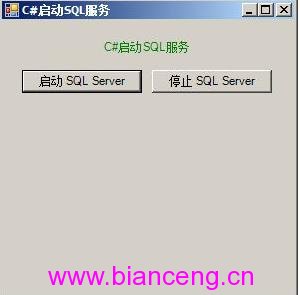
MSSQLSERVER,命名實例為 MSSQL$實例名,可在「服務」管理工具確認。System.ComponentModel.Win32Exception(存取被拒)。WaitForStatus 確認狀態變更完成,避免 UI 假死。