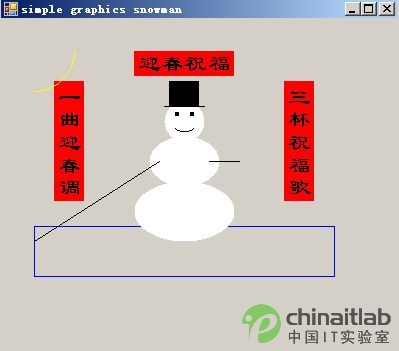
private void PrintDramC(Graphics g)
{
    const int MID = 150;
    const int TOP = 50;

    this.Text = "Simple Graphics Snowman";
    Font font = new Font("隸書", 17);

    Pen blue = new Pen(Color.Blue);
    Pen yellow = new Pen(Color.Yellow);
    Pen white = new Pen(Color.White);
    Pen red = new Pen(Color.Red);
    Pen black = new Pen(Color.Black);

    Brush brWhite = white.Brush;
    Brush brBlack = black.Brush;
    Brush brRed = red.Brush;

    // 裝飾邊框
    g.FillRectangle(brRed, 20, 30, 30, 120);
    g.FillRectangle(brRed, 250, 30, 30, 120);
    g.FillRectangle(brRed, 100, 0, 100, 25);

    // 直書文字
    StringFormat fmt = new StringFormat { FormatFlags = StringFormatFlags.DirectionVertical };
    g.DrawString("三杯祝福歌", font, brBlack, 250, 30, fmt);
    g.DrawString("一曲迎春調", font, brBlack, 20, 30, fmt);
    g.DrawString("迎春祝福", font, brBlack, 100, 0);

    // 天空與太陽
    g.DrawRectangle(blue, 0, 175, 300, 50);
    g.DrawEllipse(yellow, -40, -40, 80, 80);

    // 雪人主體 (三圓疊疊)
    g.FillEllipse(brWhite, MID - 20, TOP, 40, 40);      // 頭
    g.FillEllipse(brWhite, MID - 35, TOP + 35, 70, 50);  // 上身
    g.FillEllipse(brWhite, MID - 50, TOP + 80, 100, 60); // 下身

    // 五官
    g.FillEllipse(brBlack, MID - 10, TOP + 10, 5, 5);   // 左眼
    g.FillEllipse(brBlack, MID + 5, TOP + 10, 5, 5);    // 右眼
    g.DrawArc(black, MID - 10, TOP + 20, 20, 10, -190, -160); // 嘴巴

    // 手臂
    g.DrawLine(black, MID - 25, TOP + 60, TOP - 50, MID + 40);
    g.DrawLine(black, MID + 25, TOP + 60, MID + 55, TOP + 60);

    // 帽子
    g.DrawLine(black, MID - 20, TOP + 5, MID + 20, TOP + 5); // 帽檐
    g.FillRectangle(brBlack, MID - 15, TOP - 20, 30, 25);    // 帽頂
}
| 類別 | 用途 | 常用成員 |
|---|---|---|
| Graphics | 繪圖介面 | DrawLine, FillEllipse, DrawString, DrawImage |
| Pen | 輪廓線條 | Color, Width, DashStyle |
| Brush | 填充 | SolidBrush, HatchBrush, TextureBrush, LinearGradientBrush |
| Font | 字型 | FamilyName, Size, Style |
| StringFormat | 文字排版 | Alignment, LineAlignment, FormatFlags |
OnPaint 或 Paint 事件中繪圖,取得 e.Graphics,避免自行 CreateGraphics 導致重繪遺失。Dispose() 筆刷、筆、字型等實作 IDisposable 的物件,或使用 using 區塊。SmoothingMode = AntiAlias、TextRenderingHint = ClearTypeGridFit 提升視覺品質。Bitmap 離屏繪圖 (Double Buffer) 再一次性繪至螢幕。幾十行 Graphics 代碼即可畫出可愛雪人。GDI+ 雖非高效能遊戲繪圖引擎,但對表單報表、簡單動畫、自訂控件繪製足夠強大。動手嘗試修改座標、顏色、加入動畫 Timer,感受程式繪圖的樂趣!