XNA Game Studio Express 建構於 Visual C# 2005 Express Edition 之上,提供跨平台 (Windows / Xbox 360) 的 managed 遊戲開發框架。核心優勢:
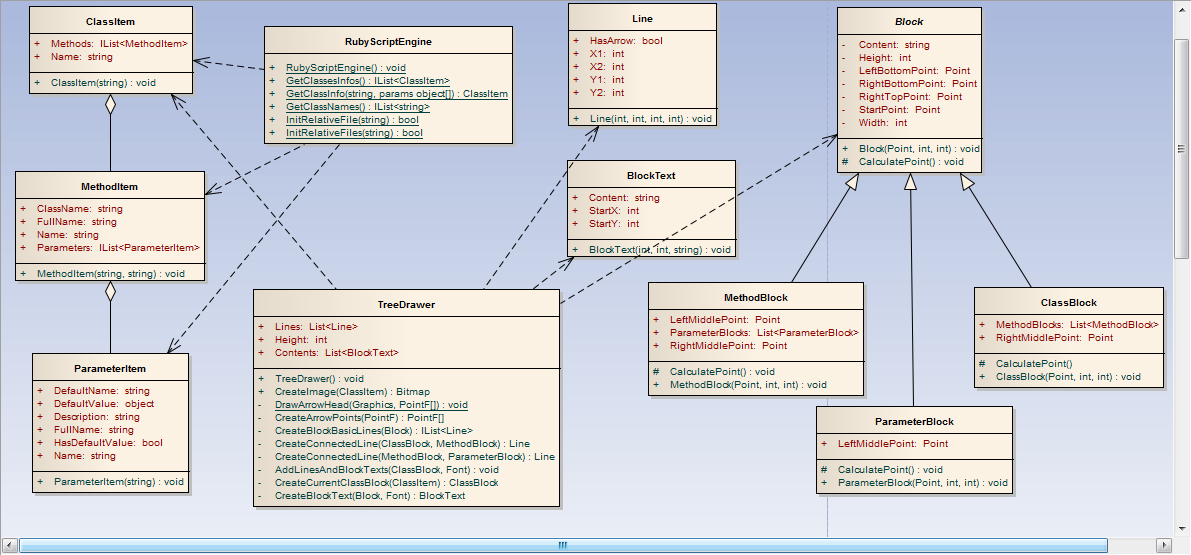
Update (邏輯) 與 Draw (繪圖) 即可。啟動專案範本「Spacewar Windows Starter Kit」可見核心類別:
SpacewarGame:繼承 Game,管理狀態機 (Logo、選單、遊戲中、勝利)。Screen 抽象基類:代表一個繪圖單元 (標題畫面、選單、遊戲關卡)。SpacewarScreen:實際遊戲畫面基類,包含雙飛船、子彈、粒子、太陽、背景等 SceneItem。Ship:玩家飛船,處理輸入、移動、無敵、超空間跳躍等狀態。private bool inShield; // 防護罩啟動中
private bool shieldUsed; // 本回合已使用
private double exitShieldTime; // 剩餘時間
private const double shieldTime = 5.0; // 持續 5 秒public bool Shield => inShield;// 在 Update 方法中,處理輸入 (X 鍵 / 手把 X 鍵)
if (XInputHelper.GamePads[player].XPressed && !shieldUsed) {
inShield = true;
shieldUsed = true;
exitShieldTime = shieldTime;
Sound.PlayCue(Sounds.PhaseActivate);
}
// 計時器倒數
if (inShield) {
exitShieldTime -= elapsedTime.TotalSeconds;
if (exitShieldTime <= 0) {
inShield = false;
Sound.PlayCue(Sounds.PhaseExpire);
}
}if (inShield && evolved) {
var texture = SpacewarGame.ContentManager.Load(Settings.MediaPath + "textures\\circle");
batch.Begin(SpriteBlendMode.AlphaBlend);
// 3D 世界座標投影至螢幕 2D
var loc = device.Viewport.Project(position, Camera.Projection, Camera.View, Matrix.Identity);
batch.Draw(texture,
new Vector2(loc.X - texture.Width/2, loc.Y - texture.Height/2),
null,
new Color(new Vector4(0, 1, 0, 0.5f)), // 半透明綠
0f,
new Vector2(texture.Width/2, texture.Height/2),
(3f * (float)Math.Abs(Math.Cos(exitShieldTime))) + 2f, // 震動縮放特效
SpriteEffects.None, 0f);
batch.End();
} // HitPlayer2 開頭
if (ship2.Shield) {
Sound.PlayCue(Sounds.WeaponPickup); // 彈開音效
return;
}
// HitPlayer1 同理Content/Textures → 開啟 B1_nebula01.tga 屬性,查看 Content Importer、Content Processor、Asset Name。