Windows 8 棄用 MessageBox,改用 Windows.UI.Popups.MessageDialog,配合 async/await 實現非阻塞 UI 的對話方塊。
| 成員 | 用途 |
|---|---|
| ShowAsync() | 非同步顯示對話方塊 |
| Commands | 自訂按鈕集合 (UICommand) |
| DefaultCommandIndex | Enter 鍵觸發的預設按鈕索引 |
| CancelCommandIndex | Esc 鍵觸發的取消按鈕索引 |
| Title | 對話方塊標題 |
await,編譯器生成狀態機規則:含 await 的方法必須標記 async。
private async void First_Click(object sender, RoutedEventArgs e) {
    var msg = new MessageDialog("Hello World!這是第一個提示。");
    msg.Title = "提示1";
    await msg.ShowAsync();
}private async void Secend_Click(object sender, RoutedEventArgs e) {
var msg = new MessageDialog("Hello World!這是第二個提示。") { Title = "提示2" };
msg.Commands.Add(new UICommand("確定", cmd => tbText.Text = "你點擊了確定按鈕,第二組提示"));
msg.Commands.Add(new UICommand("取消", cmd => tbText.Text = "你點擊了取消按鈕,第二組提示"));
await msg.ShowAsync();
}private async void Third_Click(object sender, RoutedEventArgs e) {
var msg = new MessageDialog("Hello World!這是第三個提示。") { Title = "提示3" };
msg.Commands.Add(new UICommand("確定", null, 0));
msg.Commands.Add(new UICommand("取消", null, 1));
msg.DefaultCommandIndex = 0;
msg.CancelCommandIndex = 1;
var result = await msg.ShowAsync();
switch (Convert.ToInt32(result.Id)) {
case 0: tbText.Text = "你點擊了確定按鈕,第三組提示"; break;
case 1: tbText.Text = "你點擊了取消按鈕,第三組提示"; break;
}
}private async void Fourth_Click(object sender, RoutedEventArgs e) {
var msg = new MessageDialog("Hello World!這是第四個提示。") { Title = "提示4" };
msg.Commands.Add(new UICommand("確定", new UICommandInvokedHandler(ShowTextEnter)));
msg.Commands.Add(new UICommand("取消", new UICommandInvokedHandler(ShowTextCancel)));
msg.DefaultCommandIndex = 0;
msg.CancelCommandIndex = 1;
await msg.ShowAsync();
}
private void ShowTextEnter(IUICommand cmd) { tbText.Text = "你點擊了確定按鈕,第四組提示"; }
private void ShowTextCancel(IUICommand cmd) { tbText.Text = "你點擊了取消按鈕,第四組提示"; }<Grid Background="{StaticResource ApplicationPageBackgroundThemeBrush}">
<Button Name="First" Content="First Msg" Click="First_Click" .../>
<Button Name="Secend" Content="Second Msg" Click="Secend_Click" .../>
<Button Name="Third" Content="Third Msg" Click="Third_Click" .../>
<Button Name="Fourth" Content="Fourth Msg" Click="Fourth_Click" .../>
<TextBlock Name="tbText" FontSize="16" .../>
</Grid>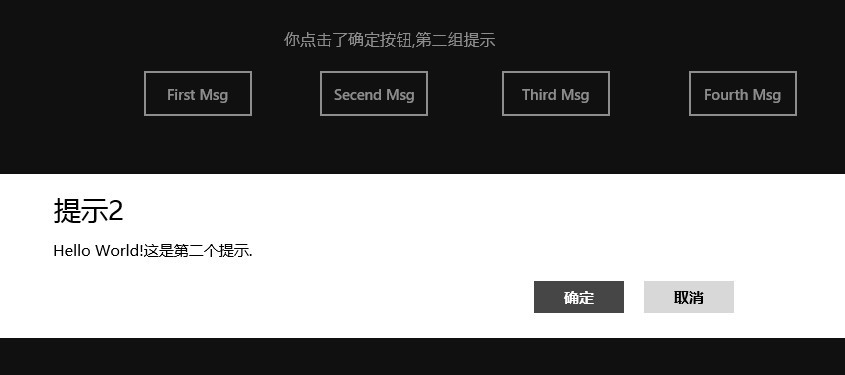
原始碼下載:Win8Message.zip