Windows 8 控制項提供兩種右鍵互動事件:
TextBox 等輸入類控制項Button、Grid 等非輸入類控制項兩者皆透過 PopupMenu 類別建立彈出選單。
public async void SetRightClick(object sender) {
    var menu = new PopupMenu();
    menu.Commands.Add(new UICommand("複製 0", null, 0));
    menu.Commands.Add(new UICommand("剪貼 1", null, 1));
    menu.Commands.Add(new UICommand("貼上 2", null, 2));
    menu.Commands.Add(new UICommandSeparator());
    menu.Commands.Add(new UICommand("全螢幕", null, 3));
    menu.Commands.Add(new UICommand("快照螢幕", null, 4));

    // 於控制項位置顯示選單
    var cmd = await menu.ShowForSelectionAsync(GetRectPosition((FrameworkElement)sender));
    if (cmd != null) {
        tbText.Text = $"選擇了({cmd.Label}),其 ID 為 {cmd.Id}";
    } else {
        tbText.Text = "內容選單";
    }
}

// 計算控制項螢幕座標矩形
Rect GetRectPosition(FrameworkElement element) {
    var transform = element.TransformToVisual(null);
    var point = transform.TransformPoint(new Point());
    return new Rect(point, new Size(element.ActualWidth, element.ActualHeight));
}protected override void OnNavigatedTo(NavigationEventArgs e) {
base.OnNavigatedTo(e);
tbName.ContextMenuOpening += tbName_ContextMenuOpening; // 輸入控制項
gdMenu.RightTapped += gdMenu_RightTapped; // 非輸入控制項
}
void gdMenu_RightTapped(object sender, RightTappedRoutedEventArgs e) {
SetRightClick(sender);
}
void tbName_ContextMenuOpening(object sender, ContextMenuEventArgs e) {
SetRightClick(sender);
}
protected override void OnNavigatedFrom(NavigationEventArgs e) {
base.OnNavigatedFrom(e);
tbName.ContextMenuOpening -= tbName_ContextMenuOpening;
gdMenu.RightTapped -= gdMenu_RightTapped;
}<Grid Background="{StaticResource ApplicationPageBackgroundThemeBrush}" Name="gdMenu">
<TextBox Name="tbName" Margin="141,164,0,0" Height="157" Width="540" .../>
<TextBox Name="tbText" Margin="210,353,0,0" Width="290" .../>
</Grid>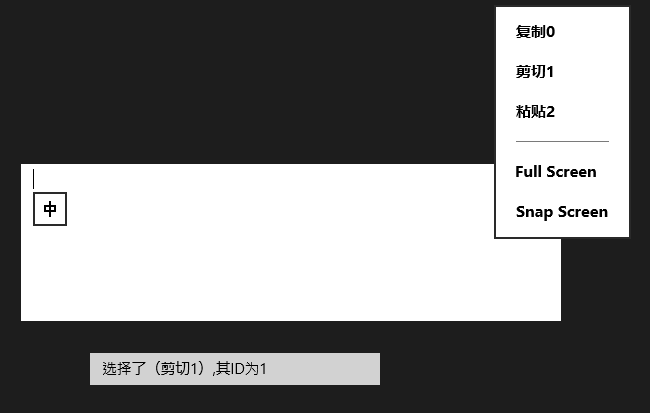
原始碼下載:Win8Menu.rar