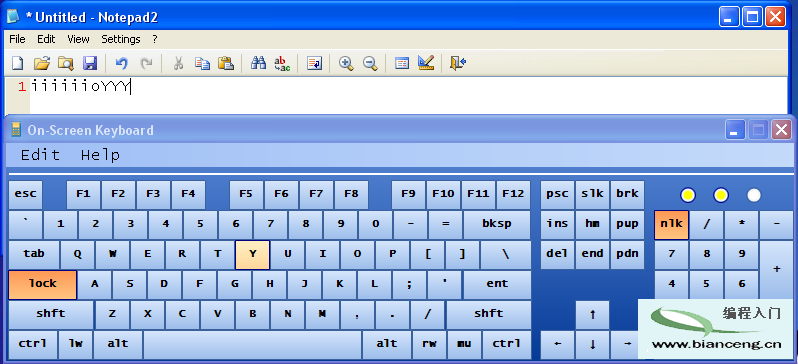
普通電腦無 GPIO,但偶爾需讀取簡單開關信號(如拉繩開關觸發程序、門磁檢測)。買單片機/擴展卡太貴,串口(COM)零成本解決。
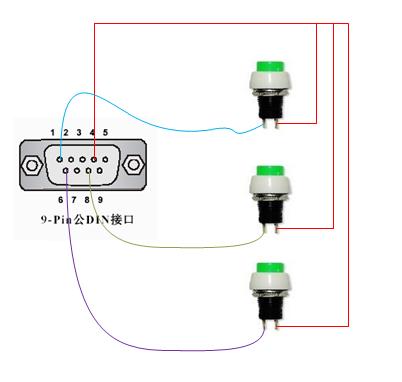
串口 DB9 接口:
將 DTR/RTS 接至開關公共端,開關另一端分別接 DCD/DSR/CTS。軟體啟用 DTR/RTS,輪詢三腳位電平變化即得 3 路開關量輸入。
// 輸出電壓
serialPort.DtrEnable = true;
serialPort.RtsEnable = true;

// 讀取輸入
bool cd = serialPort.CDHolding;
bool dsr = serialPort.DsrHolding;
bool cts = serialPort.CtsHolding;
public class SerialPortSwitch {
    private readonly SerialPort _port = new SerialPort();
    private readonly PinState[] _pins = {
        new PinState { PinName = Pin.CD },
        new PinState { PinName = Pin.CTS },
        new PinState { PinName = Pin.DSR }
    };
    public event Action SwitchOn;
    public event Action SwitchOff;

    public SerialPortSwitch(string portName) {
        _port.PortName = portName;
        _port.BaudRate = 9600;
        _port.Parity = Parity.None;
        _port.DataBits = 8;
        _port.StopBits = StopBits.Two;
        _port.DtrEnable = _port.RtsEnable = true;
    }

    public void Start() { /* 啟動後台線程輪詢 */ }
    public void Stop(bool wait = true) { /* 停止線程 */ }

    private void OnRunning() {
        _port.Open();
        while (!_stopPending) {
            foreach (var pin in _pins) CheckState(pin);
            Thread.Sleep(20); // 20ms 輪詢間隔
        }
    }

    private void CheckState(PinState pin) {
        bool current = GetPinHolding(pin.PinName);
        if (pin.IsHolding == current) pin.StableTick = Environment.TickCount;
        if (Environment.TickCount - pin.StableTick > 100) { // 100ms 消抖
            if (pin.IsHolding != current) {
                pin.IsHolding = current;
                if (current) SwitchOn?.Invoke(pin.PinName);
                else SwitchOff?.Invoke(pin.PinName);
            }
        }
    }

    private bool GetPinHolding(Pin pin) => pin switch {
        Pin.CD => _port.CDHolding,
        Pin.DSR => _port.DsrHolding,
        Pin.CTS => _port.CtsHolding,
        _ => throw new ArgumentOutOfRangeException()
    };
}

public enum Pin { CD = 1, DSR = 6, CTS = 8 }
public class PinState { public Pin PinName; public bool IsHolding; public int StableTick; }
var sw = new SerialPortSwitch("COM6");
sw.SwitchOn += p => Console.WriteLine($"{p}\tOn");
sw.SwitchOff += p => Console.WriteLine($"{p}\tOff");
sw.Start();
Console.ReadKey();
sw.Stop();
撥動開關即可在控制台看到即時輸出。