灰度直方圖統計像素在各灰度級(0-255)的分佈,**直觀反映影像對比度、曝光、動態範圍**,是影像增強(如直方圖均衡化)的基礎。本文提供完整 C# 實現:LockBits 高速統計 + GDI+ 繪製座標軸與柱狀圖。
H(k) = 第 k 灰度級像素數,k ∈ [0, 255] (8-bit 灰度圖)。

public partial class HistogramForm : Form {
    private Bitmap _srcBmp;
    private int[] _counts = new int[256];
    private int _maxCount;

    public HistogramForm(Bitmap bmp) {
        InitializeComponent();
        _srcBmp = bmp;
        ComputeHistogram();
    }

    private void ComputeHistogram() {
        // 1. LockBits 複製像素到陣列
        var rect = new Rectangle(0, 0, _srcBmp.Width, _srcBmp.Height);
        var bmpData = _srcBmp.LockBits(rect, ImageLockMode.ReadOnly, _srcBmp.PixelFormat);
        IntPtr ptr = bmpData.Scan0;
        int bytes = _srcBmp.Width * _srcBmp.Height * 3; // 假設 24bpp
        byte[] pixels = new byte[bytes];
        Marshal.Copy(ptr, pixels, 0, bytes);
        _srcBmp.UnlockBits(bmpData);

        // 2. 統計灰度分佈 (取 R 通道即可,灰度圖 RGB 相同)
        Array.Clear(_counts, 0, 256);
        _maxCount = 0;
        foreach (byte v in pixels) {
            int c = ++_counts[v];
            if (c > _maxCount) _maxCount = c;
        }
    }

    protected override void OnPaint(PaintEventArgs e) {
        base.OnPaint(e);
        DrawHistogram(e.Graphics);
    }

    private void DrawHistogram(Graphics g) {
        const int marginX = 50, marginY = 30, width = 256, height = 200;
        int x0 = marginX, y0 = marginY + height;
        Pen pen = Pens.Black;

        // 座標軸
        g.DrawLine(pen, x0, y0, x0 + width, y0); // X 軸
        g.DrawLine(pen, x0, y0, x0, marginY);     // Y 軸

        // X 軸刻度與標籤 (每 50)
        for (int k = 0; k <= 250; k += 50) {
            int x = x0 + k;
            g.DrawLine(pen, x, y0, x, y0 + 2);
            g.DrawString(k.ToString(), Font, Brushes.Black, x - 4, y0 + 4);
        }
        // Y 軸最大值標籤
        g.DrawLine(pen, x0 - 2, marginY, x0, marginY);
        g.DrawString(_maxCount.ToString(), Font, Brushes.Black, x0 - 30, marginY - 4);

        // 柱狀圖 (縮放至 height)
        float scale = (float)height / _maxCount;
        for (int k = 0; k < 256; k++) {
            int h = (int)(_counts[k] * scale);
            g.DrawLine(pen, x0 + k, y0, x0 + k, y0 - h);
        }
        pen.Dispose();
    }
}byte[],**避免 GetPixel 慢速陷阱**。pixels 陣列直接統計即可(步長 1),無需按 3 步長取通道。scale = drawHeight / maxCount 將最高柱映射至繪圖區高度,其餘按比例縮放。OnPaint 中純繪圖,**視窗縮放/遮擋自動重繪**無需重算。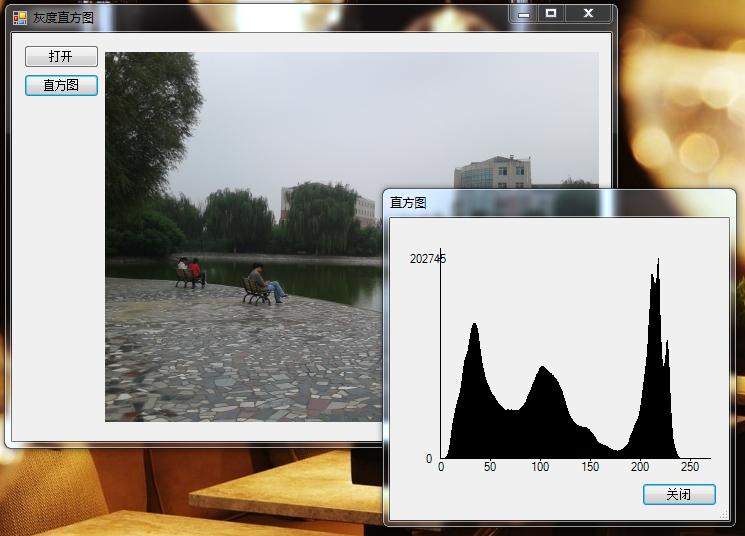
Grey-ScaleMap.rar (含原始碼與測試影像)
掌握 LockBits 統計與 GDI+ 繪圖管線,即可構建專業級影像分析工具。