繪圖需取得 DC:一般情況 GetDC → 繪圖 → ReleaseDC;處理 WM_PAINT 時使用 BeginPaint → 繪圖 → EndPaint(內部自動處理 Get/Release DC)。
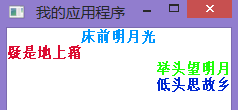
使用 DrawText 繪製文字,SetTextColor 設定顏色。若需逐行繪製,可透過 GetTextMetrics 取得文字高度 (tm.tmHeight) 計算行距:
case WM_PAINT: {
    PAINTSTRUCT ps; BeginPaint(hwnd, &ps);
    TEXTMETRIC tm; GetTextMetrics(ps.hdc, &tm);
    RECT rect = {0, ps.rcPaint.left, ps.rcPaint.right, tm.tmHeight};

    SetTextColor(ps.hdc, RGB(0,150,255));
    DrawText(ps.hdc, L"床前明月光", -1, &rect, DT_CENTER);

    rect.top += tm.tmHeight; rect.bottom += tm.tmHeight;
    SetTextColor(ps.hdc, RGB(220,12,50));
    DrawText(ps.hdc, L"疑是地上霜", -1, &rect, DT_LEFT);

    rect.top += tm.tmHeight; rect.bottom += tm.tmHeight;
    SetTextColor(ps.hdc, RGB(30,255,7));
    DrawText(ps.hdc, L"舉頭望明月", -1, &rect, DT_RIGHT);

    rect.top += tm.tmHeight; rect.bottom += tm.tmHeight;
    SetTextColor(ps.hdc, RGB(0,40,210));
    DrawText(ps.hdc, L"低頭思故鄉", -1, &rect, DT_RIGHT);

    EndPaint(hwnd, &ps);
} return 0;
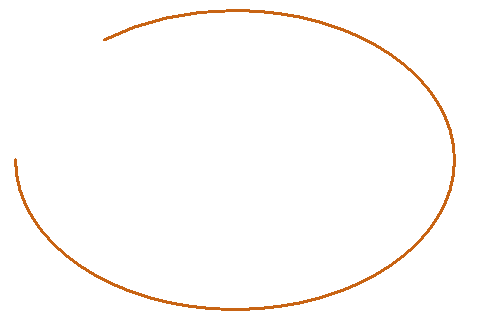
Arc(hdc, x1, y1, x2, y2, x3, y3, x4, y4):
HPEN pen = CreatePen(PS_SOLID, 3, RGB(200,100,20));
auto oldObj = SelectObject(ps.hdc, pen);
Arc(ps.hdc, 20, 150, 300, 450, 90, 162, 85, 300);
SelectObject(ps.hdc, oldObj);
DeleteObject(pen);
SetArcDirection(hdc, AD_CLOCKWISE) 設為順時針,AD_COUNTERCLOCKWISE 為逆時針(預設)。
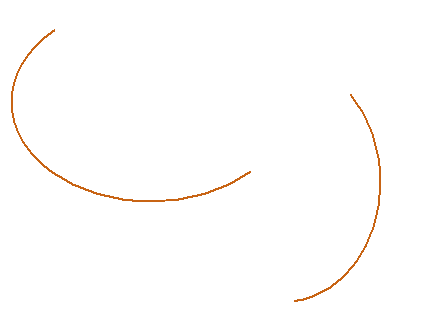
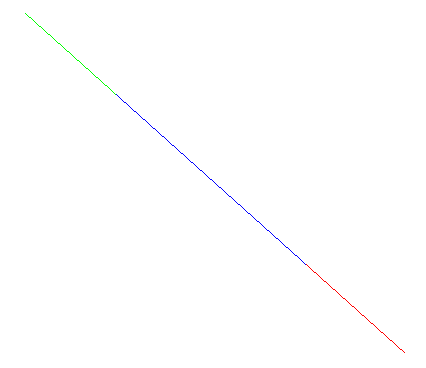
LineDDA(x1, y1, x2, y2, LineDDAProc, lpData) 會對線段上每個整數座標點呼叫回呼函式,可實現分段著色等效果。
VOID CALLBACK LineDDAProc(int x, int y, LPARAM lpData) {
    HDC hdc = *((HDC*)lpData);
    int type = 0;
    if (x <= 510 || y <= 200) type = 0;
    else if ((x > 510 && x <= 700) || (y > 720 && y <= 360)) type = 1;
    else type = 2;

    switch (type) {
        case 0: SetPixel(hdc, x, y, RGB(0,255,0)); break;
        case 1: SetPixel(hdc, x, y, RGB(0,0,255)); break;
        case 2: SetPixel(hdc, x, y, RGB(255,0,0)); break;
    }
}
LineDDA(420, 130, 800, 470, LineDDAProc, (LPARAM)&ps.hdc);
#include <Windows.h>

LRESULT CALLBACK WindowProc(HWND hwnd, UINT msg, WPARAM wParam, LPARAM lParam);
VOID CALLBACK LineDDAProc(int x, int y, LPARAM lpData);

int WINAPI WinMain(HINSTANCE hTheApp, HINSTANCE hPrevApp, LPSTR cmdline, int nShow) {
    WNDCLASS wc = { };
    wc.hbrBackground = (HBRUSH)(COLOR_WINDOW + 1);
    wc.hInstance = hTheApp;
    wc.lpfnWndProc = WindowProc;
    wc.lpszClassName = L"MyApp";
    wc.style = CS_HREDRAW | CS_VREDRAW;
    RegisterClass(&wc);

    HWND hwnd = CreateWindow(L"MyApp", L"我的應用程式",
                             WS_OVERLAPPEDWINDOW | WS_VISIBLE,
                             35, 28, 600, 500, NULL, NULL, hTheApp, NULL);
    if (hwnd == NULL) return -1;

    MSG msg;
    while (GetMessage(&msg, NULL, 0, 0)) {
        TranslateMessage(&msg);
        DispatchMessage(&msg);
    }
    return 0;
}

LRESULT CALLBACK WindowProc(HWND hwnd, UINT msg, WPARAM wParam, LPARAM lParam) {
    PAINTSTRUCT ps;
    switch (msg) {
        case WM_DESTROY:
            PostQuitMessage(0); return 0;
        case WM_PAINT: {
            BeginPaint(hwnd, &ps);

            // 多行多色文字
            TEXTMETRIC tm; GetTextMetrics(ps.hdc, &tm);
            RECT rect = {0, ps.rcPaint.left, ps.rcPaint.right, tm.tmHeight};
            SetTextColor(ps.hdc, RGB(0,150,255));
            DrawText(ps.hdc, L"床前明月光", -1, &rect, DT_CENTER);
            rect.top += tm.tmHeight; rect.bottom += tm.tmHeight;
            SetTextColor(ps.hdc, RGB(220,12,50));
            DrawText(ps.hdc, L"疑是地上霜", -1, &rect, DT_LEFT);
            rect.top += tm.tmHeight; rect.bottom += tm.tmHeight;
            SetTextColor(ps.hdc, RGB(30,255,7));
            DrawText(ps.hdc, L"舉頭望明月", -1, &rect, DT_RIGHT);
            rect.top += tm.tmHeight; rect.bottom += tm.tmHeight;
            SetTextColor(ps.hdc, RGB(0,40,210));
            DrawText(ps.hdc, L"低頭思故鄉", -1, &rect, DT_RIGHT);

            // 順時針弧線
            HPEN pen = CreatePen(PS_SOLID, 3, RGB(200,100,20));
            auto oldObj = SelectObject(ps.hdc, pen);
            SetArcDirection(ps.hdc, AD_CLOCKWISE);
            Arc(ps.hdc, 20, 150, 300, 450, 90, 162, 85, 300);
            SelectObject(ps.hdc, oldObj);
            DeleteObject(pen);

            // LineDDA 分段著色
            LineDDA(420, 130, 800, 470, LineDDAProc, (LPARAM)&ps.hdc);

            EndPaint(hwnd, &ps);
        } return 0;
    }
    return DefWindowProc(hwnd, msg, wParam, lParam);
}

VOID CALLBACK LineDDAProc(int x, int y, LPARAM lpData) {
    HDC hdc = *((HDC*)lpData);
    int type = 0;
    if (x <= 510 || y <= 200) type = 0;
    else if ((x > 510 && x <= 700) || (y > 720 && y <= 360)) type = 1;
    else type = 2;
    switch (type) {
        case 0: SetPixel(hdc, x, y, RGB(0,255,0)); break;
        case 1: SetPixel(hdc, x, y, RGB(0,0,255)); break;
        case 2: SetPixel(hdc, x, y, RGB(255,0,0)); break;
    }
}
WM_PAINT 繪圖流程:BeginPaint → 繪圖 → EndPaintGetTextMetrics 取得文字度量資訊,計算行距Arc 繪製弧線,SetArcDirection 控制順/逆時針LineDDA 以回呼函式逐點處理線段,可實現特殊視覺效果DeleteObject 釋放