良好的 Qt 專案架構要求標頭檔(.h)與實作檔(.cpp)職責分明。本文以經典 FindDialog 範例,詳細解析各檔案應包含的內容與設計原則。
#ifndef FINDDIALOG_H
#define FINDDIALOG_H

#include <QtGui/QDialog>  // 基類定義(必要)

// 前向宣告:減少編譯相依、加速編譯
class QCheckBox;
class QLabel;
class QLineEdit;
class QPushButton;

class FindDialog : public QDialog {
    Q_OBJECT  // Qt 元物件系統宏(訊號/槽、屬性、RTTI)

public:
    explicit FindDialog(QWidget *parent = nullptr);  // explicit 防隱性轉換
    ~FindDialog();  // 解構函式宣告(若需自訂清理)

signals:  // 訊號:供外部連接
    void findNext(const QString &str, Qt::CaseSensitivity cs);
    void findPrevious(const QString &str, Qt::CaseSensitivity cs);

private slots:  // 私有槽:內部邏輯回應
    void findClicked();
    void enableFindButton(const QString &text);

private:  // 實作細節:僅標頭檔可見
    QLabel *label;
    QLineEdit *lineEdit;
    QCheckBox *caseCheckBox;
    QCheckBox *backwardCheckBox;
    QPushButton *findButton;
    QPushButton *closeButton;
};

#endif // FINDDIALOG_H
QDialog),其餘使用前向宣告。private。Q_OBJECT 必須放在類別定義首行,啟用 MOC 處理。const T&,避免不必要複製。#include <QApplication>
#include "finddialog.h"
int main(int argc, char *argv[]) {
QApplication app(argc, argv); // 應用程式物件(單例)
FindDialog *dialog = new FindDialog;
dialog->show(); // 非模態顯示
return app.exec(); // 進入事件迴圈
}
#include <QtGui>  // 模組整體包含(Qt4 風格),Qt5 建議精確包含
#include "finddialog.h"

FindDialog::FindDialog(QWidget *parent) : QDialog(parent) {
    // 1. 建立子元件
    label = new QLabel(tr("Find &what:"));
    lineEdit = new QLineEdit;
    label->setBuddy(lineEdit);  // 伙伴關係:Alt+W 聚焦 lineEdit

    caseCheckBox = new QCheckBox(tr("Match &case"));
    backwardCheckBox = new QCheckBox(tr("Search &backward"));
    findButton = new QPushButton(tr("&Find"));
    findButton->setDefault(true);
    findButton->setEnabled(false);
    closeButton = new QPushButton(tr("Close"));

    // 2. 訊號/槽連接
    connect(lineEdit, SIGNAL(textChanged(const QString&)),
            this, SLOT(enableFindButton(const QString&)));
    connect(findButton, SIGNAL(clicked()), this, SLOT(findClicked()));
    connect(closeButton, SIGNAL(clicked()), this, SLOT(close()));

    // 3. 版面配置
    QHBoxLayout *topLeftLayout = new QHBoxLayout;
    topLeftLayout->addWidget(label);
    topLeftLayout->addWidget(lineEdit);

    QVBoxLayout *leftLayout = new QVBoxLayout;
    leftLayout->addLayout(topLeftLayout);
    leftLayout->addWidget(caseCheckBox);
    leftLayout->addWidget(backwardCheckBox);

    QVBoxLayout *rightLayout = new QVBoxLayout;
    rightLayout->addWidget(findButton);
    rightLayout->addWidget(closeButton);
    rightLayout->addStretch();  // 底部彈性空間

    QHBoxLayout *mainLayout = new QHBoxLayout;
    mainLayout->addLayout(leftLayout);
    mainLayout->addLayout(rightLayout);
    setLayout(mainLayout);  // 設定對話框主版面

    setWindowTitle(tr("Find"));
    setFixedHeight(sizeHint().height());  // 固定高度
}

FindDialog::~FindDialog() {
    // 子元件由 Qt 父子機制自動刪除,通常無需手動 delete
}

void FindDialog::findClicked() {
    QString text = lineEdit->text();
    Qt::CaseSensitivity cs = caseCheckBox->isChecked()
                           ? Qt::CaseInsensitive : Qt::CaseSensitive;

    if (backwardCheckBox->isChecked())
        emit findPrevious(text, cs);
    else
        emit findNext(text, cs);
}

void FindDialog::enableFindButton(const QString &text) {
    findButton->setEnabled(!text.isEmpty());
}
new QWidget(parent) 建立所有權,父物件銷毀時自動清理子物件。tr(),支援多語系。connect(sender, &Sender::signal, receiver, &Receiver::slot) 編譯期檢查。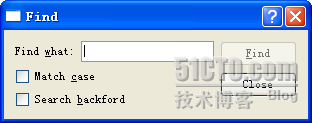
#include <QDialog>、#include <QLabel> 等,替代 <QtGui>。nullptr 替代 0。QScopedPointer / std::unique_ptr 管理非 Qt 物件資源。uic 處理 .ui 檔案,分離 UI 描述與邏輯程式碼。