Excel 中合併儲存格會導致數據只存在於左上角儲存格,其他儲存格為空。需遍歷合併區域判斷當前儲存格是否屬於合併區,若是則取左上角值。
/** 獲取 Sheet 所有合併區域 */ public ListgetCombineCell(Sheet sheet) { List list = new ArrayList<>(); int count = sheet.getNumMergedRegions(); for (int i = 0; i < count; i++) { list.add(sheet.getMergedRegion(i)); } return list; }
/** 判斷儲存格是否為合併儲存格,是則返回左上角值 */ public String isCombineCell(ListmergedList, Cell cell, Sheet sheet) { int cellRow = cell.getRowIndex(); int cellCol = cell.getColumnIndex(); for (CellRangeAddress ca : mergedList) { int firstRow = ca.getFirstRow(), lastRow = ca.getLastRow(); int firstCol = ca.getFirstColumn(), lastCol = ca.getLastColumn(); if (cellRow >= firstRow && cellRow <= lastRow && cellCol >= firstCol && cellCol <= lastCol) { // 取左上角儲存格值 Row fRow = sheet.getRow(firstRow); Cell fCell = fRow.getCell(firstCol); return getCellValue(fCell); // 需自行實現 getCellValue } } return ""; // 非合併區返回空 }
getCombineCell() 獲取合併區域列表isCombineCell() 判斷CellRangeAddress 表示,含 firstRow/lastRow/firstColumn/lastColumnDateUtil.isCellDateFormatted() 判斷並格式化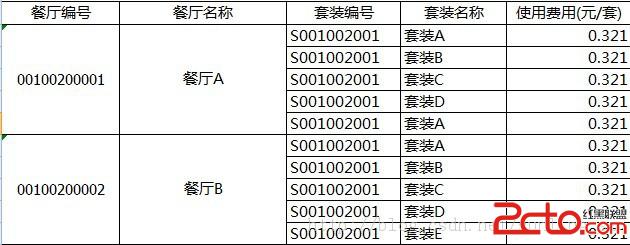
可封裝為工具類 ExcelMergeCellReader,提供 readSheet(Sheet) 返回 List,內部自動處理合併邏輯,業務代碼零侵入。