練習 3:加密資料庫連線資訊
學習如何加密資料庫連線字串。
開啟 DataEx3.sln,預設路徑 C:\Program Files\Microsoft Enterprise Library January 2006\labs\cs\Data Access\exercises\ex03\begin,編譯。
Configuration 命名空間類別完成,支援兩種加密:DPAPIProtectedConfigurationProvider:使用 Windows DPAPIRsaProtectedConfigurationProvider:使用 RSA 演算法ProductMaintenance 加入參考:System.Configuration.dll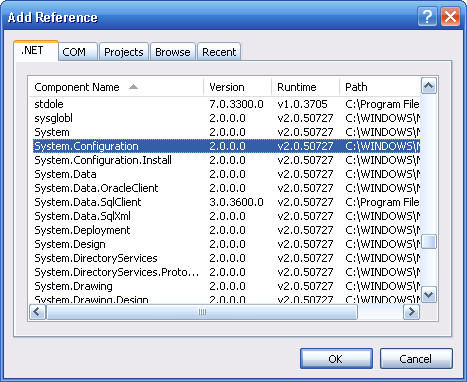
Program.cs,加入命名空間:using System.Configuration;ProtectConfiguration 方法加入代碼:static void ProtectConfiguration()
{
string provider = "RsaProtectedConfigurationProvider";
Configuration config = ConfigurationManager.OpenExeConfiguration(ConfigurationUserLevel.None);
ConfigurationSection section = config.ConnectionStrings;
if ((section.SectionInformation.IsProtected == false) &&
(section.ElementInformation.IsLocked == false))
{
section.SectionInformation.ProtectSection(provider);
section.SectionInformation.ForceSave = true;
config.Save(ConfigurationSaveMode.Full);
}
}執行應用程式,開啟 bin\Debug\ProductMaintenance.exe.config,連線資訊已加密:
<connectionStrings configProtectionProvider="RsaProtectedConfigurationProvider">
  <EncryptedData Type="https://www.w3.org/2001/04/xmlenc#Element" ...>
    <CipherValue>...加密內容...</CipherValue>
  </EncryptedData>
</connectionStrings>
建議三個練習完成時間共 30 分鐘。