系列第三篇,深入探討 Controller 向 View 傳遞資料的三種主要方式:ViewDataDictionary、ViewData.Model (強型別)、TempData,並說明各自適用場景與最佳實踐。
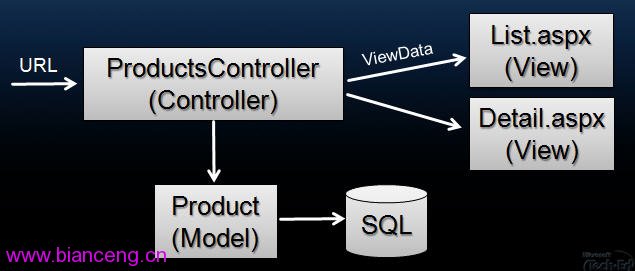
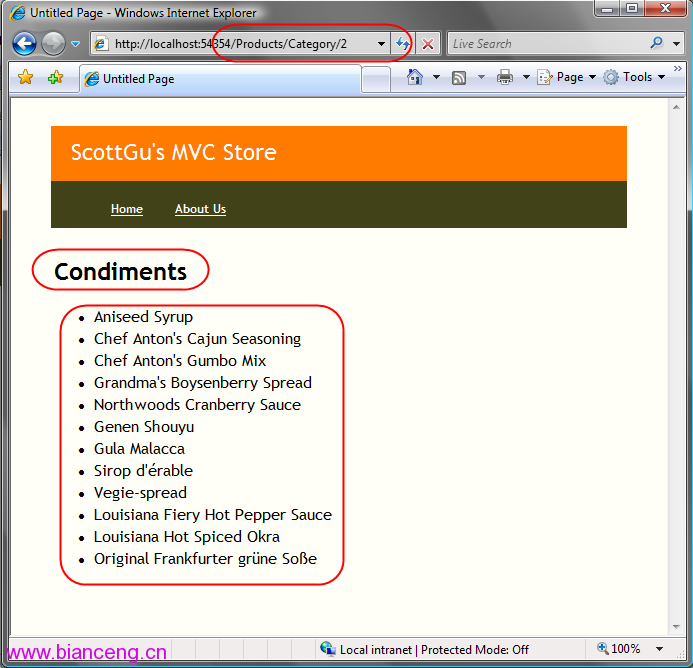
public ActionResult Index()
{
    var products = _repo.GetAll();
    ViewData["Products"] = products; // key-value 存放
    ViewData["PageTitle"] = "產品目錄";
    return View();
}
View 中取用:
<h1><%= ViewData["PageTitle"] %></h1>
<% foreach (var p in (IEnumerable<Product>)ViewData["Products"]) { %>
    <div><%= p.Name %> - <%= p.Price.ToString("C") %></div>
<% } %>缺點:需型別轉換、無 IntelliSense、拼字錯誤執行時才發現。
public ActionResult Index()
{
    var products = _repo.GetAll();
    return View(products); // 直接傳遞模型,隱含存入 ViewData.Model
}
View 頁面宣告模型型別:
<%@ Page Inherits="System.Web.Mvc.ViewPage<IEnumerable<Product>>" %>
<h1>產品目錄</h1>
<% foreach (var p in Model) { %> <!-- 直接使用 Model,IntelliSense 完整支援 --%>
    <div><%= p.Name %> - <%= p.Price.ToString("C") %></div>
<% } %>優點:編譯時期型別檢查、完整 IntelliSense、重構安全、程式碼可讀性高。
當 View 需要多個不相關資料集 (如:產品列表 + 分類導航 + 使用者資訊 + 廣告),建立專用 ViewModel:
public class ProductListViewModel
{
    public IEnumerable<Product> Products { get; set; }
    public IEnumerable<Category> Categories { get; set; }
    public UserProfile CurrentUser { get; set; }
    public Advertisement BannerAd { get; set; }
}

public ActionResult Index()
{
    var vm = new ProductListViewModel
    {
        Products = _repo.GetAll(),
        Categories = _repo.GetCategories(),
        CurrentUser = GetCurrentUser(),
        BannerAd = _adRepo.GetRandomBanner()
    };
    return View(vm);
}
View 繼承 `<%@ Page Inherits=\"ViewPage
[HttpPost]
public ActionResult Create(Product product)
{
    if (ModelState.IsValid)
    {
        _repo.Add(product);
        TempData["SuccessMessage"] = "產品已新增";
        return RedirectToAction("Index");
    }
    return View(product);
}

// Index View
<% if (TempData["SuccessMessage"] != null) { %>
    <div class="alert-success"><%= TempData["SuccessMessage"] %></div>
<% } %>| 方式 | 型別安全 | IntelliSense | 適用場景 | 生命週期 |
|---|---|---|---|---|
| ViewData[key] | 否 | 無 | 簡單單一資料、動態屬性 | 單一請求 |
| View(Model) | 是 | 完整 | 單一主要資料集 | 單一請求 |
| ViewModel | 是 | 完整 | 複雜頁面、多資料來源 | 單一請求 |
| TempData[key] | 否 | 無 | 跨 Redirect 傳遞暫時資訊 | 下一請求 (讀取即刪) |