ASP.NET 2.0 引入母版頁與網站導航兩大功能,徹底解決過去需靠 User Control 或手工複製版面的痛點,讓開發者能輕鬆建立一致的站級版面佈局與導航體驗。
ContentPlaceHolder 定義可編輯區域Web.sitemap 定義網站結構SiteMapProvider 抽象類別,支援自訂提供者(資料庫、XML、Web Service 等)Menu、TreeView、SiteMapPath(麵包屑)專案包含:
App_Code:Northwind.xsd (Typed DataSet)、BLL 類別(ProductsBLL.vb、CategoriesBLL.vb 等)App_Data:NORTHWND.MDF 資料庫Web.config 組態檔Styles.css 樣式表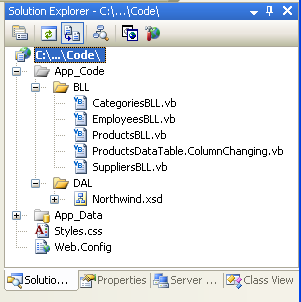
<%@ Master Language="C#" AutoEventWireup="true" CodeFile="Site.master.cs" Inherits="SiteMaster" %>
<!DOCTYPE html>
<html>
<head runat="server">
    <title><asp:ContentPlaceHolder ID="HeadContent" runat="server" /></title>
    <link href="Styles.css" rel="stylesheet" type="text/css" />
</head>
<body>
    <form id="form1" runat="server">
    <div id="header">
        <h1>教學範例網站</h1>
        <asp:Menu ID="MainMenu" runat="server" DataSourceID="SiteMapDataSource1" Orientation="Horizontal" />
        <asp:SiteMapDataSource ID="SiteMapDataSource1" runat="server" ShowStartingNode="false" />
    </div>
    <div id="main">
        <asp:ContentPlaceHolder ID="MainContent" runat="server" />
    </div>
    <div id="footer">
        © 2024 教學範例網站
    </div>
    </form>
</body>
</html><?xml version="1.0" encoding="utf-8" ?>
<siteMap xmlns="https://schemas.microsoft.com/AspNet/SiteMap-File-1.0">
<siteMapNode url="~/Default.aspx" title="首頁" description="網站首頁">
<siteMapNode url="~/Products.aspx" title="產品列表" description="瀏覽所有產品" />
<siteMapNode url="~/Categories.aspx" title="分類管理" description="產品分類維護">
<siteMapNode url="~/CategoryEdit.aspx" title="新增分類" description="建立新分類" />
</siteMapNode>
<siteMapNode url="~/Admin/" title="後台管理" description="系統管理區" roles="Administrators" />
</siteMapNode>
</siteMap>關鍵屬性:
url:相對或絕對路徑title:選單顯示文字description:ToolTip 與 SEO 用途roles:角色型安全性修剪(需啟用角色管理)<%@ Page Language="C#" MasterPageFile="~/Site.master" AutoEventWireup="true"
CodeFile="Default.aspx.cs" Inherits="_Default" Title="首頁" %>
<asp:Content ID="Content1" ContentPlaceHolderID="HeadContent" Runat="Server">
<meta name="description" content="教學範例網站首頁" />
</asp:Content>
<asp:Content ID="Content2" ContentPlaceHolderID="MainContent" Runat="Server">
<h2>歡迎來到教學範例網站</h2>
<p>這是使用母版頁與網站導航建立的示範專案。</p>
</asp:Content>麵包屑導航(通常放在母版頁內容區上方):
<asp:SiteMapPath ID="SiteMapPath1" runat="server"
PathSeparator=" > " RenderCurrentNodeAsLink="false" />樹狀導航(側邊欄):
<asp:TreeView ID="TreeView1" runat="server" DataSourceID="SiteMapDataSource1"
NodeIndent="10" ExpandDepth="1" />子母版頁繼承父母版頁,適合區域性版面差異(如管理後台與前台不同側邊欄)。
<%@ Master Language="C#" MasterPageFile="~/Site.master" %>
<asp:Content ContentPlaceHolderID="MainContent" Runat="Server">
    <div id="adminSidebar"><asp:TreeView ... /></div>
    <asp:ContentPlaceHolder ID="AdminContent" Runat="Server" />
</asp:Content>繼承 StaticSiteMapProvider,從資料庫讀取選單結構,支援執行期異動選單項目。
ASP.NET 4.0+ 可搭配 System.Web.Routing 使用友善 URL,站點地圖節點 URL 可對應路由名稱。
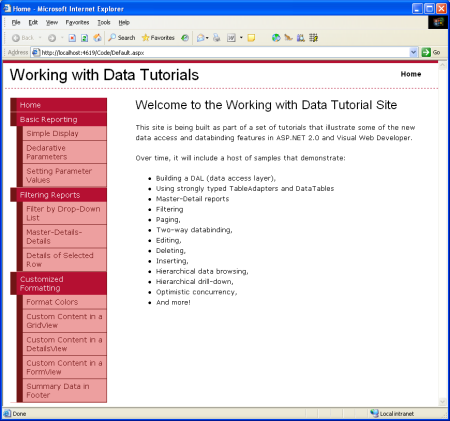
圖:教學完成時的網站外觀,包含頂部水平選單、左側樹狀導航、麵包屑、內容區域與頁尾。
母版頁與網站導航是 ASP.NET WebForms 建構可維護、一致性網站的基石。善用這兩項功能,配合角色型安全性修剪,能以最少程式碼實現企業級的站級版面與導航架構。