URL 重寫是 SEO 友善、使用者體驗、安全性隱藏技術細節的關鍵技術。本文以實作專案為例,示範如何使用微軟 `URLRewriter.dll` 搭配自訂 `HttpModule`,達成「任意 URL 重寫至 `.aspx` 帶參數頁面」的完整流程,含正則比對邏輯、Web.config 註冊、IIS 副檔名對應設定。
使用者瀏覽:https://song2.cn/viewnews/2009/3/2.html
實際重寫:https://song2.cn/viewnews.aspx?id=2&year=2009&month=3
支援多筆規則、正則擷取群組參數 (`$1`, `$2`...)、預設導向錯誤頁。
下載 `URLRewriter.dll` (微軟官方 / CodePlex 歷史版本),加入專案參考。
using System;
using System.Web;
using URLRewriter;

namespace URL
{
    public class MyRewriter : BaseModuleRewriter
    {
        protected override void Rewrite(string requestedPath, HttpApplication app)
        {
            // 正則比對範例
            if (System.Text.RegularExpressions.Regex.IsMatch(requestedPath,
                @"viewnews/(\d{4})/(\d{1,2})/(\d{1,2})\.html"))
            {
                var match = System.Text.RegularExpressions.Regex.Match(requestedPath,
                    @"viewnews/(\d{4})/(\d{1,2})/(\d{1,2})\.html");
                string id = match.Groups[3].Value;
                string year = match.Groups[1].Value;
                string month = match.Groups[2].Value;
                app.Context.RewritePath($"/viewnews.aspx?id={id}&year={year}&month={month}");
            }
            else
            {
                app.Context.RewritePath("/here.aspx"); // 預設/錯誤頁
            }
        }
    }
}
<configuration>
  <system.web>
    <httpModules>
      <add type="URL.MyRewriter" name="URLRewriter" />
    </httpModules>
    <compilation debug="true" />
    <authentication mode="Windows" />
  </system.web>
</configuration>
IIS 7+ 整合模式** 需改註冊至 `
<system.webServer>
  <modules>
    <add name="URLRewriter" type="URL.MyRewriter" />
  </modules>
</system.webServer>
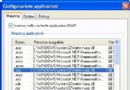
預設 IIS 不會將 `.html` 請求交給 ASP.NET 處理,必須手動對應:
如此 `.html` 請求才會進入 ASP.NET 管線,觸發 `HttpModule` 重寫邏輯。
`URLRewriter` 內建支援組態檔規則定義:
<configSections>
  <section name="RewriterConfig"
           type="URLRewriter.Config.RewriterConfigSerializerSectionHandler, URLRewriter" />
</configSections>

<RewriterConfig>
  <Rules>
    <RewriterRule>
      <LookFor>~/Sell/(\d+)\.html</LookFor>
      <SendTo>~/Search/Search_Sell.aspx?id=$1</SendTo>
    </RewriterRule>
    <RewriterRule>
      <LookFor>~/Buy/(\d+)\.html</LookFor>
      <SendTo>~/Search/Search_Buy.aspx?id=$1</SendTo>
    </RewriterRule>
  </Rules>
</RewriterConfig>

<system.web>
  <httpHandlers>
    <add verb="*" path="*.aspx" type="URLRewriter.RewriterFactoryHandler, URLRewriter" />
  </httpHandlers>
</system.web>
| 問題 | 原因 | 解決 |
|---|---|---|
| .html 不重寫 | IIS 未對應 .html 至 aspnet_isapi.dll | 完成步驟 4 設定 |
| 規則不生效 | 正則寫錯 / LookFor 路徑格式不符 (含/不含 ~) | 用 Regex Tester 驗證、記錄 requestedPath 除錯 |
| 無限重導向 | RewritePath 目標又符合 LookFor 條件 | 目標用 .aspx、或加排除條件 |
| PostBack 後網址變回 .aspx | 表單 action 為原始 .aspx 路徑 | 用 Control Adapter 覆寫 Form Action、或 JavaScript 修正 |
| IIS 7+ 模組不載入 | 註冊在 system.web 而非 system.webServer | 移至 ` |
URL Rewrite 是「不變更後端邏輯,改善前端呈現」的經典技術。無論用 HttpModule、Routing、IIS 模組或網關,核心都是**將外部可見 URL 映射至內部處理端點**,掌握攔截點、比對邏輯、參數傳遞、副檔名對應這四大關鍵,即可在任何 ASP.NET 版本中遊刃有餘。