If-Modified-Since (IMS) 是 HTTP/1.1 標準請求標頭,配合回應標頭 Last-Modified 實現條件式請求:瀏覽器將快取資源的最後修改時間送回伺服器,伺服器比對後決定回傳 304 Not Modified(不含實體)或 200 OK(含新內容),大幅節省頻寬與延遲。
200 OK + 內容 + Last-Modified: GMT時間If-Modified-Since: GMT時間304 Not Modified(無 Response Body)200 OK + 新內容 + 新 Last-Modified第一次請求:
If-Modified-SinceHTTP/1.1 200 OK, Last-Modified: Wed, 04 Jan 2017 02:45:10 GMT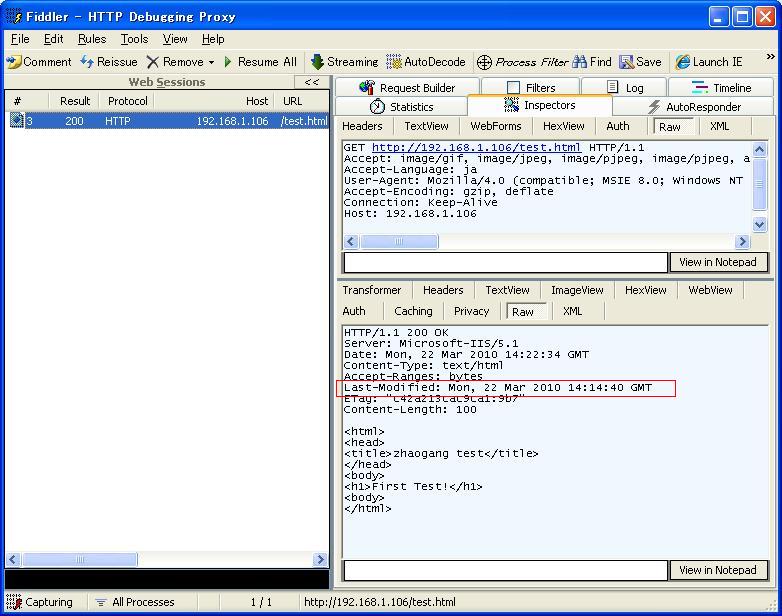
第二次請求:
If-Modified-Since: Wed, 04 Jan 2017 02:45:10 GMTHTTP/1.1 304 Not Modified(無內容,極小封包)public class StaticFileHandler : IHttpHandler {
public void ProcessRequest(HttpContext context) {
string filePath = context.Request.MapPath(context.Request.Path);
if (!File.Exists(filePath)) {
context.Response.StatusCode = 404;
return;
}
FileInfo fi = new FileInfo(filePath);
DateTime lastModified = fi.LastWriteTimeUtc;
// 設定 Last-Modified 回應標頭
context.Response.Cache.SetLastModified(lastModified);
// 檢查 If-Modified-Since
string imsHeader = context.Request.Headers["If-Modified-Since"];
if (!string.IsNullOrEmpty(imsHeader)) {
if (DateTime.TryParse(imsHeader, out DateTime clientTime)) {
// 比較精度到秒(HTTP 日期格式無毫秒)
if (clientTime >= lastModified.AddSeconds(-1)) {
context.Response.StatusCode = 304;
context.Response.StatusDescription = "Not Modified";
context.Response.SuppressContent = true; // 不輸出 Body
return;
}
}
}
// 未修改或無 IMS → 輸出檔案
context.Response.ContentType = GetMimeType(fi.Extension);
context.Response.WriteFile(filePath);
}
public bool IsReusable => true;
}
IIS 7+ 整合模式下,靜態檔案(.html, .css, .js, .jpg 等)由 StaticFileModule 自動處理 IMS/Last-Modified/ETag,無需撰寫代碼。確保 web.config 未移除該模組:
<system.webServer>
  <modules>
    <remove name="StaticFileModule" /> <!-- 勿移除 -->
  </modules>
</system.webServer>
| 特性 | Last-Modified | ETag |
|---|---|---|
| 精度 | 秒級 | 內容雜湊/版本號,更精確 |
| 適用場景 | 靜態檔案、資料庫更新時間 | 動態內容、分散式系統 |
| 請求標頭 | If-Modified-Since | If-None-Match |
| 共存 | 可同時啟用,伺服器任一匹配即回 304 | |
[OutputCache(Duration = 3600, VaryByParam = "none", Location = OutputCacheLocation.ServerAndClient)]
public ActionResult Article(int id) {
    var article = repo.Get(id);
    // 手動設定 Last-Modified 為文章更新時間
    Response.Cache.SetLastModified(article.UpdatedAt);
    return View(article);
}
Last-Modified 格式為 RFC 1123 GMTLast-Modified 或 ETag,或程式碼每次產生新物件導致 ETag 異