編輯頁面常有 20+ 欄位,手寫 txtName.Text = entity.Name、entity.Name = txtName.Text 既繁瑣又易漏。Hxj.Data 內建 EntityUtils 輔助類,依慣例命名自動完成雙向繫結。
頁面控制項 ID = 前綴 + 實體屬性名,例如前綴 txt_:
txt_ProductName → entity.ProductNametxt_UnitPrice → entity.UnitPricetxt_Discontinued (CheckBox) → entity.Discontinued (bool)public class Products : Entity {
public int ProductID { get; set; }
public string ProductName { get; set; }
public int? SupplierID { get; set; }
public int? CategoryID { get; set; }
public string QuantityPerUnit { get; set; }
public decimal? UnitPrice { get; set; }
public int? UnitsInStock { get; set; }
public int? UnitsOnOrder { get; set; }
public int? ReorderLevel { get; set; }
public bool Discontinued { get; set; }
}
<form id="form1" runat="server">
    ProductName:<asp:TextBox ID="txt_ProductName" runat="server" /><br />
    SupplierID:<asp:TextBox ID="txt_SupplierID" runat="server" /><br />
    CategoryID:<asp:TextBox ID="txt_CategoryID" runat="server" /><br />
    QuantityPerUnit:<asp:TextBox ID="txt_QuantityPerUnit" runat="server" /><br />
    UnitPrice:<asp:TextBox ID="txt_UnitPrice" runat="server" /><br />
    UnitsInStock:<asp:TextBox ID="txt_UnitsInStock" runat="server" /><br />
    UnitsOnOrder:<asp:TextBox ID="txt_UnitsOnOrder" runat="server" /><br />
    ReorderLevel:<asp:TextBox ID="txt_ReorderLevel" runat="server" /><br />
    Discontinued:<asp:CheckBox ID="txt_Discontinued" runat="server" /><br />
    <asp:Button ID="Button1" Text="提交Insert" OnClick="Button1_Click" />
    <asp:GridView ID="gridView" runat="server" />
</form>
// 1. 查詢實體 → 自動填入頁面(編輯/詳情頁)
Products product = DbSession.Default.From().ToFirst();
EntityUtils.SetDocumentValue(product, "txt_"); // 關鍵:前綴 "txt_"

// 2. 頁面輸入 → 自動填入實體(新增/修改頁)
protected void Button1_Click(object sender, EventArgs e) {
    Products p = new Products();
    EntityUtils.UpdateModel(p, "txt_"); // 讀取所有 txt_* 控制項值

    int newId = DbSession.Default.Insert(p);
    gridView.DataSource = DbSession.Default.From()
                                .Where(Products._.ProductID == newId).ToList();
    gridView.DataBind();
}
| CLR 型別 | 對應控制項 | 取值/賦值方式 |
|---|---|---|
| string | TextBox, HiddenField, Label | .Text |
| int, decimal, DateTime, bool 等 | TextBox | .Text → TypeConverter 轉換 |
| bool | CheckBox | .Checked |
| enum | DropDownList, RadioButtonList | .SelectedValue |
自動處理 null、DBNull、空字串轉換,型別不符時不拋出例外、只略過並記錄 Debug 訊息。
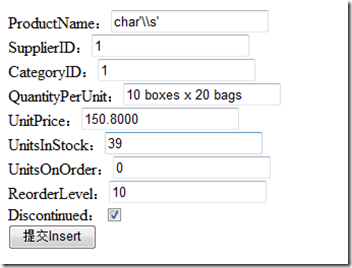
所有欄位瞬間填入資料,零手工程式碼。修改後按下「提交」同樣一行 UpdateModel 完成回寫,極大提升開發效率。