課程專題採用 ASP.NET MVC 建置班級網站,核心功能之一為使用者註冊。本文記錄註冊介面實作與資料註解驗證的應用經驗。
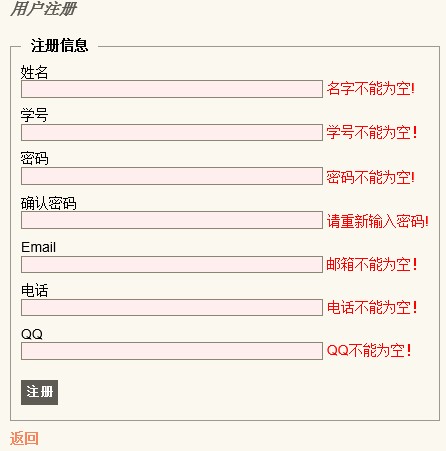
使用 <fieldset> 結構化表單,語意清晰、無障礙友善:
@model ClassSite.Models.RegisterViewModel

@using (Html.BeginForm("Register", "Account", FormMethod.Post, new { @class = "form-horizontal" })) {
    <fieldset>
        <legend>使用者註冊</legend>

        @Html.AntiForgeryToken()

        <div class="form-group">
            @Html.LabelFor(m => m.UserName, new { @class = "col-md-2 control-label" })
            <div class="col-md-10">
                @Html.TextBoxFor(m => m.UserName, new { @class = "form-control" })
                @Html.ValidationMessageFor(m => m.UserName, "", new { @class = "text-danger" })
            </div>
        </div>

        <div class="form-group">
            @Html.LabelFor(m => m.Email, new { @class = "col-md-2 control-label" })
            <div class="col-md-10">
                @Html.TextBoxFor(m => m.Email, new { @class = "form-control" })
                @Html.ValidationMessageFor(m => m.Email, "", new { @class = "text-danger" })
            </div>
        </div>

        <div class="form-group">
            @Html.LabelFor(m => m.Password, new { @class = "col-md-2 control-label" })
            <div class="col-md-10">
                @Html.PasswordFor(m => m.Password, new { @class = "form-control" })
                @Html.ValidationMessageFor(m => m.Password, "", new { @class = "text-danger" })
            </div>
        </div>

        <div class="form-group">
            @Html.LabelFor(m => m.ConfirmPassword, new { @class = "col-md-2 control-label" })
            <div class="col-md-10">
                @Html.PasswordFor(m => m.ConfirmPassword, new { @class = "form-control" })
                @Html.ValidationMessageFor(m => m.ConfirmPassword, "", new { @class = "text-danger" })
            </div>
        </div>

        <div class="form-group">
            <div class="col-md-offset-2 col-md-10">
                <input type="submit" value="註冊" class="btn btn-primary" />
            </div>
        </div>
    </fieldset>
}
using System.ComponentModel.DataAnnotations;

public class RegisterViewModel {
    [Required(ErrorMessage = "請輸入使用者名稱")]
    [StringLength(50, MinimumLength = 3, ErrorMessage = "使用者名稱長度 3-50 字元")]
    [Display(Name = "使用者名稱")]
    public string UserName { get; set; }

    [Required(ErrorMessage = "請輸入電子郵件")]
    [EmailAddress(ErrorMessage = "電子郵件格式不正確")]
    [Display(Name = "電子郵件")]
    public string Email { get; set; }

    [Required(ErrorMessage = "請輸入密碼")]
    [StringLength(100, MinimumLength = 6, ErrorMessage = "密碼至少 6 字元")]
    [DataType(DataType.Password)]
    [Display(Name = "密碼")]
    public string Password { get; set; }

    [Required(ErrorMessage = "請確認密碼")]
    [DataType(DataType.Password)]
    [Display(Name = "確認密碼")]
    [Compare("Password", ErrorMessage = "兩次輸入密碼不一致")]
    public string ConfirmPassword { get; set; }
}
| 屬性 | 用途 |
|---|---|
[Required] | 必填欄位 |
[StringLength(max, MinimumLength=min)] | 字串長度範圍 |
[RegularExpression(pattern)] | 正則表達式匹配 |
[Range(min, max)] | 數值範圍 |
[EmailAddress] | Email 格式 (內建正則) |
[Phone] | 電話格式 |
[Url] | URL 格式 |
[Compare("OtherProperty")] | 比較兩屬性相等 (確認密碼) |
[Remote("Action", "Controller")] | 伺服器端非同步驗證 (檢查帳號唯一性) |
[DataType(DataType.Password)] | 提示瀏覽器/編輯器為密碼欄位 |
[HttpGet]
public ActionResult Register() {
    return View();
}

[HttpPost]
[ValidateAntiForgeryToken]
public async Task Register(RegisterViewModel model) {
    if (ModelState.IsValid) {
        // 建立使用者 (ASP.NET Identity)
        var user = new ApplicationUser { UserName = model.UserName, Email = model.Email };
        var result = await UserManager.CreateAsync(user, model.Password);

        if (result.Succeeded) {
            await SignInManager.SignInAsync(user, isPersistent: false, rememberBrowser: false);
            return RedirectToAction("Index", "Home");
        }
        AddErrors(result); // 將 Identity 錯誤加入 ModelState
    }
    // 驗證失敗,回傳 View 顯示錯誤訊息
    return View(model);
}

private void AddErrors(IdentityResult result) {
    foreach (var error in result.Errors) {
        ModelState.AddModelError("", error);
    }
}
確保 web.config 啟用 (預設開啟):
<appSettings>
    <add key="ClientValidationEnabled" value="true" />
    <add key="UnobtrusiveJavaScriptEnabled" value="true" />
</appSettings>
引用必要腳本 (BundleConfig 已包含):
@Scripts.Render("~/bundles/jqueryval")
瀏覽器端自動產生 data-val-* 屬性,jQuery Validation 套件無縫處理。
ModelState.IsValid,否則資料完整性無保障。IValidatableObject 或自訂 ValidationAttribute。fieldset + Bootstrap 橫向表單,語意與視覺並重。[Compare] 處理確認密碼,[Remote] 支援非同步唯一性檢查。ModelState.IsValid 檢查,配合 ASP.NET Identity 完成使用者建立與登入。