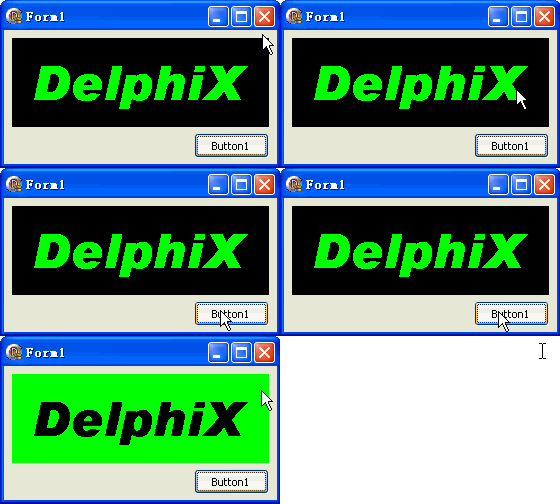
TDIB.DrawMono 將來源圖像轉換為雙色(單色)圖像,指定前景色與背景色,常用於生成位圖字型、圖示遮罩或特殊視覺風格。本文提供以文字繪製為素材的完整範例。
unit Unit1;
interface
uses Windows, Messages, SysUtils, Variants, Classes, Graphics, Controls, Forms,
  Dialogs, DIB, StdCtrls;
type
  TForm1 = class(TForm)
    DXPaintBox1: TDXPaintBox;
    Button1: TButton; // 執行單色轉換
    procedure FormCreate(Sender: TObject);
    procedure Button1Click(Sender: TObject);
  end;
var Form1: TForm1;
implementation {$R *.dfm}
const c1 = clBlack; c2 = clLime;
var w, h: Integer;

procedure TForm1.FormCreate(Sender: TObject);
begin
  w := DXPaintBox1.ClientWidth;
  h := DXPaintBox1.ClientHeight;
  DXPaintBox1.DIB.SetSize(w, h, 24);
  DXPaintBox1.DIB.Fill(c1); // 黑底
  DXPaintBox1.DIB.Canvas.Brush.Style := bsClear;
  DXPaintBox1.DIB.Canvas.Font.Color := c2; // 綠字
  DXPaintBox1.DIB.Canvas.Font.Name := 'Arial Black';
  DXPaintBox1.DIB.Canvas.Font.Size := 36;
  DXPaintBox1.DIB.Canvas.Font.Style := [fsBold];
  DXPaintBox1.DIB.Canvas.TextOut(20, 10, 'DelphiX');
  DXPaintBox1.Repaint;
end;

procedure TForm1.Button1Click(Sender: TObject);
begin
  // DrawMono(Dest, X, Y, W, H, SrcX, SrcY, ForeColor, BackColor, TransparentColor)
  DXPaintBox1.DIB.DrawMono(DXPaintBox1.DIB, 0, 0, w, h, 0, 0, c1, c1, c2);
  DXPaintBox1.Repaint;
end;
end.
DrawMono(DestDIB, DstX, DstY, DstW, DstH, SrcX, SrcY, ForeColor, BackColor, TransparentColor)
c1=clBlack)c1=clBlack,同前景)c2=clLime,即綠色文字區域)執行後,原本綠色文字區域變為黑色(前景色),其餘區域也變為黑色(背景色),形成純黑圖像;若將背景色設為 clWhite 則會得到黑字白底的單色圖。