方法一:OpenDialog 直接選檔
- 元件:
TOpenDialog
- 關鍵屬性:
Filter 設定檔案類型過濾 (如 '所有檔|*.*|文字檔|*.txt|執行檔|*.exe;*.com')
- 程式碼:
if OpenDialog1.Execute then Label1.Caption := OpenDialog1.FileName;
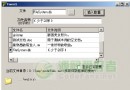
- 優點:直觀、支援多選、預覽、詳細資訊
方法二:SelectDirectory 僅選資料夾
- 單元:
FileCtrl (需 uses FileCtrl)
- 函數:
SelectDirectory(const Caption: string; const Root: WideString; var Directory: string): Boolean;
- 參數:
Caption 對話框提示文字、Root 根目錄 (空字串為「我的電腦」)、Directory 回傳選擇路徑
- 程式碼:
var strCaption, strDirectory: String; wstrRoot: WideString;
begin
  strCaption := '請選擇資料夾' + #13#10 + '雙行說明文字';
  wstrRoot := ''; // 或指定如 'C:\Program Files\Borland\Delphi5'
  if SelectDirectory(strCaption, wstrRoot, strDirectory) then
    Label2.Caption := strDirectory;
end;
- 優點:可限制根目錄防止用戶瀏覽敏感路徑、隱藏檔案細節
- 缺點:無法直接選檔,需自行在資料夾中搜尋
比較與建議
| 場景 | 推薦方法 |
|---|
| 用戶需直觀挑選特定檔案 | OpenDialog |
| 僅需指定資料夾、或隱藏檔案結構 | SelectDirectory |
| 需限制瀏覽範圍 (如僅限特定安裝目錄) | SelectDirectory + Root 參數 |