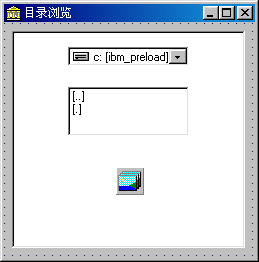
標準 TDriveComboBox/TDirectoryListBox/TFileListBox 三聯控件雖簡單但只能逐級返回根目錄切換,無法像資源管理器任意展開/折疊分支。本文展示如何結合 TTreeView、TDriveComboBox(隱藏)、TFileListBox(隱藏、模式 fdDirectory)構建全功能目錄樹,支援任意節點展開、即時加載子目錄。
DriveComboBox1.Items 獲取所有磁盤分區,作為樹頂層節點,HasChildren := True 顯示展開箭頭。OnExpanding 事件,僅當用戶展開節點時,通過 FileListBox1.Directory := 完整路徑 讀取子目錄,添加為子節點。.Text 構建完整路徑(如 C:\Windows\System32)。TImageList 提供文件夾圖標(關閉/打開)。procedure TForm1.FormCreate(Sender: TObject);
var
FirstNode, DirNode: TTreeNode;
ItemCount, Index: Integer;
ItemStr: string;
begin
ItemCount := DriveComboBox1.Items.Count;
FirstNode := DirTreeView.Items.GetFirstNode;
for Index := 0 to ItemCount - 1 do begin
ItemStr := DriveComboBox1.Items[Index];
ItemStr := Copy(ItemStr, 1, Pos(':', ItemStr)); {提取 'C:' 'D:' 等}
DirNode := DirTreeView.Items.AddChild(FirstNode, ItemStr);
DirNode.HasChildren := True; {顯示 + 號}
DirNode.ImageIndex := 0; {關閉文件夾圖標}
DirNode.SelectedIndex := 1; {打開文件夾圖標}
end;
end;procedure TForm1.DirTreeViewExpanding(Sender: TObject; Node: TTreeNode;
var AllowExpansion: Boolean);
var
DirNode: TTreeNode;
ItemCount, Index, Level, iCount: Integer;
ItemStr, StrPath: string;
begin
if Node.Count = 0 then begin {首次展開才加載}
iCount := 0;
Level := Node.Level;
DirNode := Node;
StrPath := Node.Text + '\';
{向上遞歸拼接完整路徑}
while Level > 0 do begin
StrPath := DirNode.Parent.Text + '\' + StrPath;
DirNode := DirNode.Parent;
Dec(Level);
end;
FileListBox1.Clear;
FileListBox1.Directory := StrPath; {觸發讀取}
ItemCount := FileListBox1.Items.Count;
for Index := 0 to ItemCount - 1 do begin
ItemStr := FileListBox1.Items[Index];
ItemStr := Copy(ItemStr, 2, Pos(']', ItemStr) - 2); {去除 [ ] 包裹}
if (ItemStr <> '.') and (ItemStr <> '..') then begin
DirNode := DirTreeView.Items.AddChild(Node, ItemStr);
DirNode.HasChildren := True;
DirNode.ImageIndex := 0;
DirNode.SelectedIndex := 1;
Inc(iCount);
end;
end;
if iCount = 0 then Node.HasChildren := False; {無子目錄隱藏 + 號}
end;
end;| 控件 | 關鍵屬性 |
|---|---|
| TTreeView (DirTreeView) | Images = ImageList1; OnExpanding = DirTreeViewExpanding |
| TDriveComboBox (DriveComboBox1) | Visible = False |
| TFileListBox (FileListBox1) | Visible = False; FileType = fdDirectory |
| TImageList (ImageList1) | 含 2 個圖標: 0=關閉文件夾, 1=打開文件夾 |
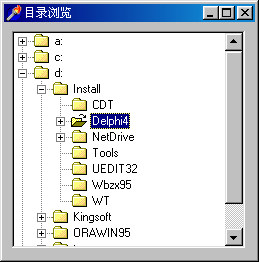
樹形圖左側顯示所有磁盤分區,點擊 + 號即時展開該目錄下子文件夾,可任意層級展開/折疊,體驗同 Windows 資源管理器一致。
unit main;

interface
uses Windows, Messages, SysUtils, Classes, Graphics, Controls, Forms, Dialogs,
  StdCtrls, FileCtrl, ComCtrls, ImgList;

type
  TForm1 = class(TForm)
    DirTreeView: TTreeView;
    FileListBox1: TFileListBox;
    DriveComboBox1: TDriveComboBox;
    ImageList1: TImageList;
    procedure FormCreate(Sender: TObject);
    procedure DirTreeViewExpanding(Sender: TObject; Node: TTreeNode;
      var AllowExpansion: Boolean);
  end;

var Form1: TForm1;

implementation
{$R *.DFM}

{ ... 以上兩個核心事件處理代碼 ... }

end.C:\Windows\winsxs) 讀取耗時,可放入後台線程,通過 TThread.Queue 回主線程添加節點,避免 UI 凍結。SHGetFileInfo 獲取系統真實文件夾圖標(含覆蓋箭頭、壓縮態等)。TVirtualTreeView (Virtual Treeview) 支援百萬節點高性能渲染,適合極大目錄樹。利用隱藏的 DriveComboBox/FileListBox 作為目錄枚舉引擎,配合 TreeView.OnExpanding 按需加載,僅需 50 行核心代碼即可構建專業級目錄樹控件,是 Delphi 快速開發文件管理介面的經典範式。