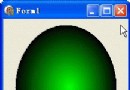
TGPImageAttributes 配合 5×5 TColorMatrix 可對影像進行紅/綠/藍/Alpha 通道的縮放、平移、混合、灰階、負片、色調旋轉等線性運算。本範例示範在繪圖時套用 ColorMatrix,將紅色通道加入常數位移,產生紅色色調偏移效果。
uses GDIPAPI, GDIPOBJ;

procedure TForm1.FormPaint(Sender: TObject);
var
  g: TGPGraphics;
  img: TGPImage;
begin
  g := TGPGraphics.Create(Canvas.Handle);
  img := TGPImage.Create('c:\temp\test.png');
  g.DrawImage(img, 0, 0, img.GetWidth, img.GetHeight);
  img.Free;
  g.Free;
end;
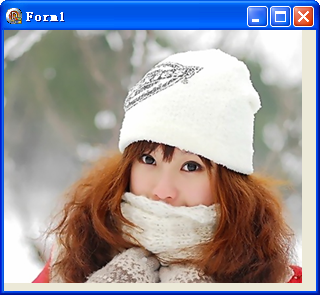
uses GDIPAPI, GDIPOBJ;

procedure TForm1.FormPaint(Sender: TObject);
var
  g: TGPGraphics;
  img: TGPImage;
  imgAtt: TGPImageAttributes;
const
  ColorMatrix: TColorMatrix = (
    (1.0, 0.0, 0.0, 0.0, 0.0),
    (0.0, 1.0, 0.0, 0.0, 0.0),
    (0.0, 0.0, 1.0, 0.0, 0.0),
    (0.0, 0.0, 0.0, 1.0, 0.0),
    (1.0, 0.0, 0.0, 0.0, 1.0)  // 第 5 列:平移向量 (R+1, G+0, B+0, A+0, W+1)
  );
begin
  g := TGPGraphics.Create(Canvas.Handle);
  img := TGPImage.Create('c:\temp\test.png');
  imgAtt := TGPImageAttributes.Create;
  imgAtt.SetColorMatrix(ColorMatrix, ColorMatrixFlagsDefault, ColorAdjustTypeDefault);
  g.DrawImage(
    img,
    MakeRect(0, 0, img.GetWidth, img.GetHeight),
    0, 0, img.GetWidth, img.GetHeight,
    UnitPixel,
    imgAtt
  );
  imgAtt.Free;
  img.Free;
  g.Free;
end;
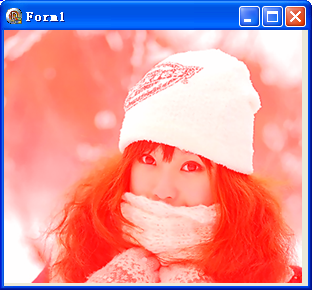
[R' G' B' A' 1] = [R G B A 1] × Matrix| 效果 | 矩陣關鍵值 |
|---|---|
| 灰階 | R=G=B=0.299/0.587/0.114 |
| 負片 | 對角 -1.0,平移 +1.0 |
| 紅色濾鏡 | G=B 行歸零,R 行保留 |
| 透明度 50% | A 對角 0.5 |
| 色調旋轉 | RGB 3×3 旋轉子矩陣 |
掌握 ColorMatrix 即掌握 GDI+ 核心影像處理能力,所有濾鏡效果皆可由此推導。